Blog

  • Unlocking Hyper-Growth: Why ERP Software is the Backbone of Modern eCommerce Businesses

    Unlocking Hyper-Growth: Why ERP Software is the Backbone of Modern eCommerce Businesses

    Unlocking Hyper-Growth: Why ERP Software is the Backbone of Modern eCommerce Businesses

    Unlocking Hyper-Growth: Why ERP Software is the Backbone of Modern eCommerce Businesses

    In the dynamic and fiercely competitive world of eCommerce, simply having an online storefront is no longer enough to thrive. Businesses are grappling with an ever-increasing complexity of operations, from managing diverse product catalogs and multi-channel sales to optimizing supply chains, fulfilling orders rapidly, and delivering personalized customer experiences. Many find themselves drowning in a sea of disparate systems, manual processes, and siloed data – a recipe for inefficiency, errors, and stunted growth.

    Enter Enterprise Resource Planning (ERP) software. Once considered the exclusive domain of large, traditional enterprises, ERP systems have evolved dramatically to become an indispensable strategic asset for eCommerce businesses of all sizes, from ambitious startups to established market leaders. More than just a collection of tools, an ERP acts as the central nervous system of an eCommerce operation, integrating critical functions into a single, cohesive platform. It’s the key to transforming operational chaos into streamlined efficiency, enabling scalability, and ultimately, unlocking hyper-growth.

    This article will delve deep into why ERP software is not just beneficial, but essential for modern eCommerce businesses, exploring its core functionalities, key benefits, crucial features to look for, and best practices for successful implementation.

    What is ERP Software? A Unified Vision for Your Business

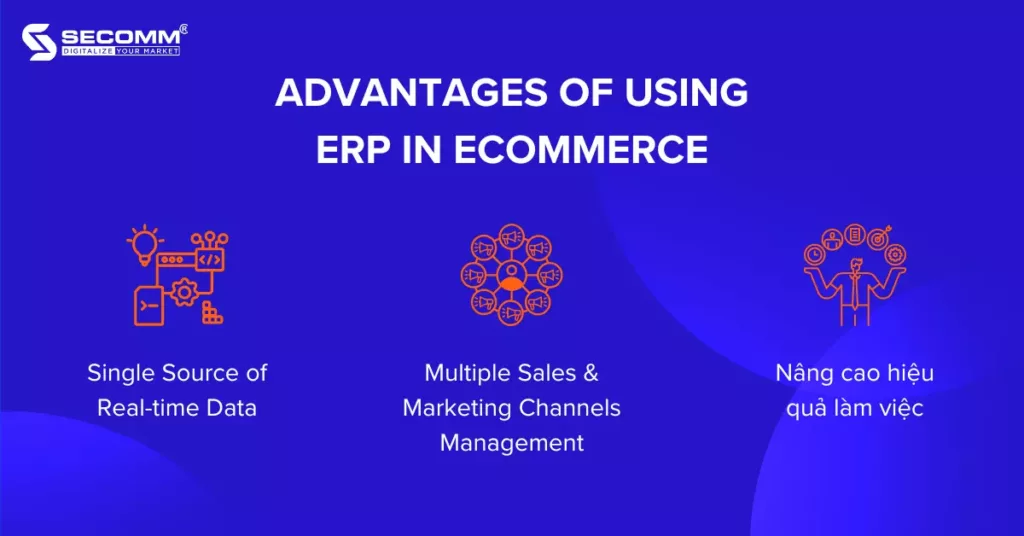
    At its core, ERP software is a suite of integrated applications that an organization can use to manage and automate many back-office functions related to technology, services, and human resources. For an eCommerce business, this translates to bringing together all the critical operational data and processes under one roof. Instead of separate systems for inventory, order management, financials, and customer data, an ERP creates a "single source of truth."

    This centralized database eliminates data silos, reduces manual data entry, minimizes errors, and provides real-time visibility across the entire business. It empowers decision-makers with accurate, up-to-the-minute information, allowing for proactive strategies rather than reactive problem-solving.

    The Unique Challenges of eCommerce and How ERP Addresses Them

    eCommerce businesses face a unique set of challenges that traditional businesses often don’t encounter to the same degree. These include:

    1. Multi-Channel Complexity: Selling across a proprietary website, Amazon, eBay, Shopify, social media, and potentially brick-and-mortar stores means managing inventory, orders, and customer data across numerous platforms.
    2. Rapid Order Fulfillment: Customers expect fast, accurate, and often free shipping. Delays or errors directly impact customer satisfaction and retention.
    3. Dynamic Inventory Management: Real-time stock visibility is crucial to prevent overselling, stockouts, and manage returns efficiently.
    4. Personalized Customer Experience: Understanding customer behavior, preferences, and purchase history is vital for targeted marketing and repeat business.
    5. Scalability Demands: eCommerce businesses can experience rapid growth spurts, requiring systems that can handle increased order volumes, new product lines, and expanding geographic reach without breaking down.
    6. Data Overload & Silos: Generating vast amounts of data, but often stored in disconnected systems, making it difficult to extract meaningful insights.
    7. Returns Management: The high volume of returns in eCommerce requires a robust, efficient process to minimize losses and maintain customer satisfaction.

    An ERP system directly tackles these challenges by providing:

    • Integrated Data: All sales channels feed into one system.
    • Automated Workflows: Reduces manual intervention in order processing, inventory updates, and financial reconciliation.
    • Real-time Visibility: Provides a live snapshot of inventory, orders, and financials.
    • Scalable Infrastructure: Built to grow with the business.

    Key Benefits of ERP for eCommerce Businesses

    The advantages of implementing an ERP system for an eCommerce business are profound and far-reaching, impacting every facet of operations and strategy.

    1. Streamlined Inventory Management:

      • Real-time Accuracy: Get an immediate, accurate view of inventory levels across all warehouses and sales channels. This eliminates overselling (selling items you don’t have) and stockouts (missing sales due to empty shelves).
      • Multi-Location Tracking: Manage inventory efficiently whether it’s in multiple warehouses, fulfillment centers, or even dropshippers.
      • Demand Forecasting: Leverage historical sales data and analytics to predict future demand, optimizing purchasing and reducing carrying costs and dead stock.
      • Automated Replenishment: Set reorder points to automatically generate purchase orders when stock levels hit a predefined minimum.
      • Returns Management: Seamlessly process returns, update inventory, and manage refunds or exchanges, minimizing disruption.
    2. Optimized Order Management & Fulfillment:

      • Centralized Order Processing: All orders from every sales channel (website, marketplaces, phone) flow into a single system.
      • Automated Order Routing: Automatically assign orders to the most appropriate warehouse or fulfillment center based on stock availability, shipping costs, or customer location.
      • Shipping & Logistics Integration: Connect directly with shipping carriers (UPS, FedEx, DHL, USPS) to generate labels, track shipments, and provide real-time updates to customers.
      • Faster Fulfillment: Reduce order processing time from hours to minutes, leading to quicker delivery and happier customers.
    3. Enhanced Customer Relationship Management (CRM):

      • 360-Degree Customer View: Consolidate all customer data – purchase history, interactions, preferences, support tickets – into one profile.
      • Personalized Experiences: Use this data to tailor marketing campaigns, product recommendations, and customer service interactions.
      • Improved Support: Customer service agents have instant access to all relevant information, enabling faster and more effective resolution of inquiries.
      • Loyalty & Retention: A better understanding of customers leads to improved service, which fosters loyalty and increases customer lifetime value.
    4. Robust Financial Management & Accounting:

      • Automated Accounting: Sales data automatically flows into the general ledger, simplifying invoicing, accounts receivable, and accounts payable.
      • Real-time Financial Reporting: Gain instant insights into revenue, costs, profitability, and cash flow.
      • Compliance & Audit Trails: Ensure financial compliance with built-in features and maintain clear audit trails for all transactions.
      • Budgeting & Forecasting: Tools to create and monitor budgets, and accurately forecast financial performance.
      • Eliminate Reconciliation Nightmares: Automatically reconcile transactions across multiple sales channels and payment gateways.
    5. Streamlined Supply Chain Management (SCM):

      • Vendor Management: Centralize vendor information, purchase orders, and payment terms.
      • Procurement Optimization: Streamline the purchasing process, from requisition to payment, and identify opportunities for cost savings.
      • Inventory Optimization: Work closely with suppliers to maintain optimal inventory levels, reducing lead times and ensuring product availability.
      • Logistics Coordination: Better manage the flow of goods from suppliers to warehouses and ultimately to customers.
    6. Actionable Data Analytics & Reporting:

      • Unified Data Source: With all data in one place, ERP systems can generate comprehensive reports that span inventory, sales, financials, and customer behavior.
      • Customizable Dashboards: Create personalized dashboards to monitor key performance indicators (KPIs) relevant to your business goals.
      • Strategic Decision Making: Gain deep insights into product performance, sales trends, customer demographics, and operational bottlenecks, enabling data-driven strategic decisions.
      • Identify Opportunities & Threats: Quickly spot top-selling products, identify underperforming items, or detect potential issues before they escalate.
    7. Scalability and Future-Proofing:

      • Growth Accommodation: ERP systems are designed to scale with your business. As order volumes increase, new product lines are added, or new markets are entered, the system can adapt without requiring a complete overhaul.
      • Reduced Operational Bottlenecks: Automation and streamlined processes ensure that growth doesn’t lead to operational chaos.
      • Foundation for Innovation: A stable, integrated platform frees up resources and provides the data needed to innovate with new services, product bundles, or marketing strategies.

    Key Features to Look for in an eCommerce ERP

    Choosing the right ERP is a critical decision. Here are essential features specific to eCommerce that you should prioritize:

    1. Native eCommerce Platform Integrations: Look for out-of-the-box connectors for popular platforms like Shopify, Magento, WooCommerce, BigCommerce, and major marketplaces like Amazon, eBay, and Walmart. An API-first approach is crucial for custom integrations.
    2. Multi-Channel & Omnichannel Capabilities: The ability to manage inventory, orders, and customer data seamlessly across all your sales channels.
    3. Advanced Inventory Management: Features like lot tracking, serial number tracking, kitting/bundling, multi-warehouse support, and inventory forecasting.
    4. Robust Order Management System (OMS): Automated order processing, fulfillment workflows, backorder management, and support for dropshipping.
    5. Shipping & Logistics Integration: Direct integrations with major carriers and third-party logistics (3PL) providers.
    6. CRM Functionality: Tools for managing customer interactions, marketing campaigns, and loyalty programs.
    7. Financial & Accounting Modules: Comprehensive general ledger, accounts payable/receivable, payroll, and robust reporting.
    8. Business Intelligence (BI) & Reporting: Customizable dashboards, real-time analytics, and the ability to generate insightful reports on all business functions.
    9. Scalability & Flexibility: The system should be able to handle increasing transaction volumes and allow for customization to fit unique business processes.
    10. Cloud-Based Deployment: For eCommerce, cloud ERP offers greater flexibility, accessibility, lower upfront infrastructure costs, automatic updates, and better disaster recovery.
    11. User-Friendly Interface: An intuitive design reduces the learning curve and increases user adoption.
    12. Mobile Accessibility: The ability to access critical information and manage tasks from mobile devices.
    13. Return Merchandise Authorization (RMA) Management: A dedicated module for efficient returns processing.

    Challenges of ERP Implementation for eCommerce

    While the benefits are clear, ERP implementation is not without its challenges:

    • Cost: ERP systems represent a significant investment in terms of software licenses, implementation services, training, and ongoing maintenance.
    • Complexity: The implementation process can be complex and time-consuming, requiring careful planning and resource allocation.
    • Change Management: Employees may resist new systems and processes, necessitating effective communication and training strategies.
    • Data Migration: Transferring historical data from old, disparate systems to the new ERP can be a painstaking and error-prone process.
    • Vendor Selection: Choosing the right ERP vendor and solution that aligns with specific business needs can be daunting given the multitude of options.
    • Integration with Existing Systems: Ensuring seamless integration with all existing eCommerce platforms, payment gateways, and other essential tools is crucial.

    Best Practices for Successful ERP Implementation in eCommerce

    To mitigate challenges and ensure a successful ERP rollout:

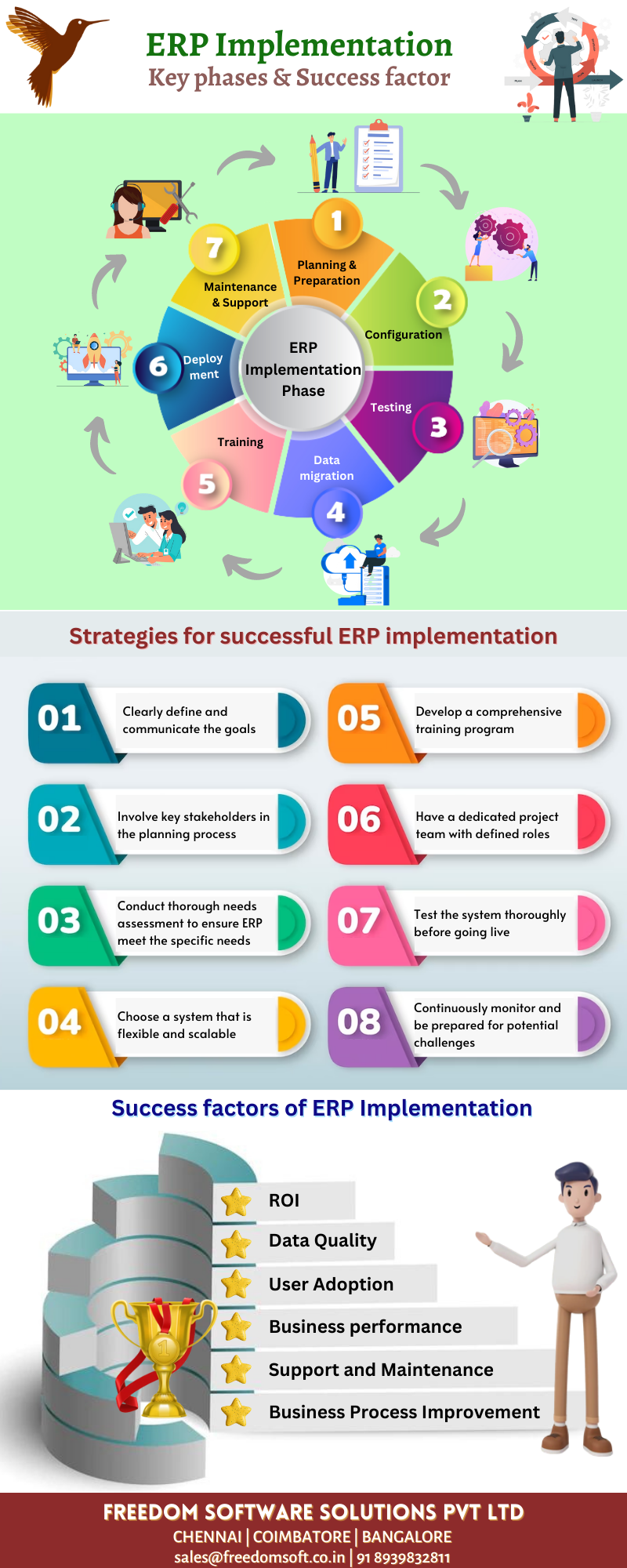
    1. Define Clear Goals & Requirements: Understand exactly what you want to achieve with the ERP and document all your specific business processes and needs.
    2. Assemble a Dedicated Project Team: Include key stakeholders from all relevant departments (operations, finance, sales, IT).
    3. Choose the Right Partner: Select an ERP vendor and implementation partner with proven experience in the eCommerce sector.
    4. Prioritize Data Cleansing: Before migration, clean and de-duplicate your existing data to ensure accuracy in the new system.
    5. Invest in Training: Provide comprehensive training to all users to ensure smooth adoption and maximize system utilization.
    6. Adopt a Phased Approach: Consider a phased implementation, rolling out modules incrementally, rather than a "big bang" approach.
    7. Thorough Testing: Conduct extensive user acceptance testing (UAT) before going live to identify and resolve issues.
    8. Plan for Post-Implementation Support: Ensure ongoing support and optimization to adapt to evolving business needs.
    9. Embrace Change Management: Communicate the benefits of the new system, address concerns, and involve employees in the process.

    Conclusion: ERP as a Strategic Imperative

    In today’s hyper-competitive eCommerce landscape, an ERP system is no longer a luxury but a strategic imperative. It’s the engine that powers efficiency, accuracy, and scalability, transforming disparate operations into a cohesive, data-driven ecosystem. By providing a single source of truth for inventory, orders, customers, and financials, ERP software empowers eCommerce businesses to:

    • Automate tedious tasks, freeing up valuable human capital.
    • Make data-driven decisions with real-time insights.
    • Enhance customer satisfaction through faster fulfillment and personalized experiences.
    • Optimize supply chain and inventory, reducing costs and improving profitability.
    • Scale seamlessly to meet growing demand and expand into new markets.

    While the journey of ERP implementation requires commitment and investment, the long-term rewards – operational excellence, sustained growth, and a significant competitive advantage – make it an invaluable investment for any eCommerce business aspiring to thrive in the digital age. By carefully planning, selecting the right solution, and executing with precision, eCommerce businesses can leverage ERP to not only survive but to truly dominate their niche.

  • Navigating the Digital Transformation: A Comprehensive Small Business ERP Implementation Guide

    Navigating the Digital Transformation: A Comprehensive Small Business ERP Implementation Guide

    Navigating the Digital Transformation: A Comprehensive Small Business ERP Implementation Guide

    Navigating the Digital Transformation: A Comprehensive Small Business ERP Implementation Guide

    In today’s fast-paced business landscape, efficiency, data-driven decision-making, and seamless operations are no longer luxuries but necessities. For small businesses, managing growth, optimizing resources, and staying competitive often means embracing digital transformation. Enterprise Resource Planning (ERP) systems, once considered the exclusive domain of large corporations, are now becoming increasingly accessible and vital for smaller enterprises.

    An ERP system integrates various functions of a business—such as finance, human resources, manufacturing, supply chain, services, procurement, and more—into a single, comprehensive software solution. This integration eliminates data silos, automates processes, and provides a unified view of the entire organization. For a small business, a successful ERP implementation can unlock significant benefits, including improved productivity, reduced operational costs, enhanced customer satisfaction, and better strategic insights.

    However, implementing an ERP system is a significant undertaking, regardless of business size. For small businesses, limited resources, budget constraints, and potential lack of in-house IT expertise can make the process seem daunting. This guide aims to demystify the small business ERP implementation journey, providing a step-by-step roadmap to ensure a successful and transformative outcome.

    Understanding the "Why": Is ERP Right for Your Small Business?

    Before diving into the implementation, it’s crucial to understand why your small business needs an ERP. Common triggers include:

    • Manual Processes & Inefficiencies: Too much time spent on manual data entry, spreadsheets, and repetitive tasks.
    • Data Silos: Information scattered across different departments, leading to inconsistencies and difficulty in getting a holistic view.
    • Lack of Real-time Visibility: Inability to quickly access accurate data on sales, inventory, finances, or customer information.
    • Scaling Challenges: Current systems struggling to keep up with growth, leading to bottlenecks and errors.
    • Compliance & Reporting Issues: Difficulty generating accurate financial reports or meeting regulatory requirements.
    • Poor Customer Experience: Inefficient processes impacting order fulfillment, customer service, and overall satisfaction.

    If any of these resonate with your business, an ERP system could be the solution to streamline operations and pave the way for sustainable growth.

    The 7 Phases of Small Business ERP Implementation

    Implementing an ERP system is a journey best approached in structured phases. While each business is unique, these phases provide a universal framework.

    Phase 1: Planning & Strategy – Laying the Foundation

    This is arguably the most critical phase. A well-defined plan sets the stage for success, preventing costly missteps later on.

    1. Define Clear Goals and Objectives:

      • What specific problems do you want to solve? (e.g., "Reduce order fulfillment time by 20%", "Improve inventory accuracy to 95%").
      • How will you measure success? (Key Performance Indicators – KPIs).
      • Ensure goals are SMART: Specific, Measurable, Achievable, Relevant, Time-bound.
      • Small Business Tip: Keep goals realistic. Don’t try to solve every problem at once. Prioritize the most impactful areas.
    2. Assemble Your Project Team:

      • Executive Sponsor: A key decision-maker with authority and commitment to the project.
      • Project Manager: An internal champion responsible for overseeing the project day-to-day. This might be a business owner or a trusted employee.
      • Departmental Leads/Key Users: Representatives from each department (finance, sales, operations, etc.) who understand their processes and will be end-users.
      • Small Business Tip: Your team might be small, with individuals wearing multiple hats. Ensure everyone understands their role and time commitment.
    3. Establish Budget & Timeline:

      • Beyond software licensing, factor in implementation costs (consultants), training, data migration, potential hardware upgrades, and ongoing maintenance/support.
      • Set a realistic timeline, understanding that unforeseen challenges can occur.
      • Small Business Tip: Be transparent about budget constraints with potential vendors. Explore SaaS (Software-as-a-Service) options, which typically have lower upfront costs and predictable monthly fees, making them ideal for small businesses.
    4. Scope Definition:

      • Determine which modules and functionalities are absolutely necessary for your business now. Avoid "scope creep" – adding features that aren’t critical.
      • Small Business Tip: Start with core functionalities and plan for future expansion. A phased approach can be more manageable.

    Phase 2: Software Selection – Finding the Right Fit

    Choosing the right ERP system is paramount. It’s not just about features, but also about vendor support, scalability, and ease of use.

    1. Detailed Requirements Gathering:

      • Document your current business processes ("as-is") and identify desired future processes ("to-be").
      • Create a comprehensive list of functional (what the system does) and non-functional (performance, security, usability) requirements.
      • Small Business Tip: Focus on your unique needs. Don’t just copy a list from another company. Prioritize "must-have" vs. "nice-to-have" features.
    2. Market Research & Vendor Shortlisting:

      • Research ERP solutions suitable for small businesses (e.g., NetSuite, QuickBooks Enterprise, Odoo, SAP Business One, Microsoft Dynamics 365 Business Central, Sage, Zoho ERP, Acumatica).
      • Look for industry-specific solutions if your business has unique requirements.
      • Read reviews, consult industry experts, and ask for recommendations.
      • Small Business Tip: Consider cloud-based solutions for lower IT overhead and better accessibility. Look for vendors with a strong track record of supporting small businesses.
    3. Vendor Demos & Evaluation:

      • Invite shortlisted vendors to demonstrate how their system addresses your specific requirements, using your actual business scenarios.
      • Prepare a standardized scorecard to evaluate each vendor on criteria like functionality, usability, scalability, support, and cost (Total Cost of Ownership – TCO).
      • Check references from similar small businesses.
      • Small Business Tip: Involve your key users in demos. Their feedback on user-friendliness is invaluable. Don’t be afraid to ask tough questions.
    4. Contract Negotiation:

      • Review contracts carefully, paying attention to licensing costs, implementation fees, support agreements, and service level agreements (SLAs).
      • Small Business Tip: Negotiate. Don’t settle for the first offer. Ensure clarity on what’s included and what’s extra.

    Phase 3: Preparation – Getting Ready for Transformation

    Once the software is selected, the real work of preparing your organization begins.

    1. Data Cleansing & Migration Strategy:

      • Cleanse: This is critical. Identify, correct, and remove inaccurate, incomplete, or irrelevant data from your existing systems. "Garbage in, garbage out" applies here.
      • Map: Determine how data from your old systems will map to the new ERP system’s structure.
      • Strategy: Decide on the migration approach (e.g., "big bang" where all data is moved at once, or phased migration).
      • Small Business Tip: This can be a labor-intensive task. Start early and dedicate sufficient time and resources. Consider using data migration tools if available.
    2. Process Mapping & Re-engineering:

      • Document your current business processes in detail.
      • Identify opportunities to optimize and streamline these processes within the new ERP system. Don’t just replicate old, inefficient ways of working.
      • Small Business Tip: Embrace the opportunity to improve. The ERP should enable better processes, not just automate existing ones.
    3. Infrastructure Assessment (if applicable):

      • If you’re using an on-premise ERP (less common for small businesses), ensure your hardware and network can support the new system.
      • For cloud-based ERPs, ensure reliable internet connectivity.
      • Small Business Tip: Cloud ERPs significantly reduce infrastructure concerns, making them a preferred choice.
    4. Change Management Strategy:

      • Prepare your employees for the upcoming changes. Communication is key.
      • Explain the benefits of the new system, address concerns, and involve them in the process.
      • Small Business Tip: Small businesses often have a tighter-knit culture, which can be an advantage for change management if handled with empathy and clear communication.

    Phase 4: Implementation & Configuration – Building the System

    This is where the chosen ERP system is tailored and built according to your requirements.

    1. System Setup & Configuration:

      • Install the software (for on-premise) or set up user accounts (for cloud).
      • Configure modules (e.g., accounting, inventory, CRM) to align with your re-engineered business processes.
      • Set up user roles, permissions, workflows, and approval processes.
      • Small Business Tip: Resist the urge for extensive customization unless absolutely necessary. Customizations can increase costs, complicate upgrades, and prolong implementation. Aim for "configuration" over "customization."
    2. Data Migration Execution:

      • Execute the data migration plan developed in Phase 3.
      • Import cleansed data into the new ERP system.
      • Small Business Tip: Perform this in stages, if possible, starting with less critical data, and always have backups.
    3. Integrations:

      • If your ERP needs to connect with other critical systems (e.g., e-commerce platform, shipping software, payroll), set up and test these integrations.
      • Small Business Tip: Prioritize essential integrations. Not every system needs to be integrated immediately.

    Phase 5: Testing & Training – Ensuring Readiness

    Thorough testing and comprehensive training are crucial for user adoption and system stability.

    1. User Acceptance Testing (UAT):

      • Key users from each department should test the system using real-world scenarios.
      • Verify that all configured processes work as expected and meet business requirements.
      • Document any issues, bugs, or discrepancies for resolution.
      • Small Business Tip: Don’t rush UAT. It’s better to find problems now than after go-live. Involve actual end-users in testing.
    2. Performance & Security Testing:

      • Ensure the system performs adequately under expected load.
      • Verify that security protocols are robust and user permissions are correctly applied.
    3. Comprehensive Training:

      • Develop a training plan tailored to different user roles.
      • Conduct hands-on training sessions for all end-users.
      • Provide clear documentation, user manuals, and quick reference guides.
      • Small Business Tip: Training should be practical and repetitive. Consider having a "super user" or "ERP champion" in each department who can provide ongoing support.

    Phase 6: Go-Live – The Big Day

    This is the moment of truth when your business transitions to the new ERP system.

    1. Final Data Migration:

      • Perform the final transfer of transactional data (e.g., open orders, current inventory levels) from legacy systems to the ERP.
      • Small Business Tip: Schedule go-live during a period of lower business activity, if possible, to minimize disruption.
    2. Cutover Strategy:

      • Define a clear plan for switching from the old systems to the new ERP.
      • This might involve a "big bang" (all at once) or a phased rollout (module by module or department by department).
      • Small Business Tip: For small businesses, a phased approach can reduce risk and allow for smoother transitions, though it might extend the overall timeline.
    3. Launch Support:

      • Have your project team and, if possible, vendor support staff on standby to assist users immediately after go-live.
      • Small Business Tip: Provide multiple channels for users to report issues or ask questions (e.g., dedicated helpdesk, email, chat).

    Phase 7: Post-Implementation & Optimization – Continuous Improvement

    Go-live is not the end of the journey; it’s the beginning of leveraging your investment.

    1. Post-Launch Support:

      • Continue to provide dedicated support to users as they adapt to the new system.
      • Address any remaining bugs or configuration issues promptly.
    2. Performance Monitoring & Feedback:

      • Continuously monitor system performance and user adoption.
      • Gather feedback from users on what’s working well and what needs improvement.
      • Small Business Tip: Schedule regular check-ins with department leads to discuss system usage and identify areas for optimization.
    3. System Optimization:

      • Based on feedback and performance data, make continuous adjustments and optimizations to workflows, reports, and configurations.
      • Explore additional modules or functionalities that can add further value.
      • Small Business Tip: ERP is a living system. Regularly review and refine its use to ensure it continues to meet your evolving business needs.
    4. Ongoing Training & Updates:

      • Provide refresher training for existing users and onboarding for new employees.
      • Stay informed about software updates and new features released by your ERP vendor.

    Key Success Factors for Small Business ERP Implementation

    • Strong Leadership & Executive Buy-in: The business owner or top management must champion the project.
    • Clear Communication & Change Management: Keep employees informed, address concerns, and manage expectations proactively.
    • Realistic Expectations: Understand that implementation is a journey, not an overnight fix. There will be challenges.
    • Dedicated Project Team: Even if small, having a focused team ensures accountability.
    • Data Quality: Invest time in cleansing and preparing your data.
    • User Training & Adoption: A powerful system is useless if employees don’t know how to use it or refuse to adopt it.
    • Vendor Relationship: Choose a vendor that understands small business needs and offers reliable support.
    • Focus on Core Needs First: Don’t get overwhelmed by features. Address your most pressing pain points.

    Common Pitfalls to Avoid

    • Lack of Clear Objectives: Without defined goals, success is impossible to measure.
    • Insufficient Budget or Resources: Underestimating costs or internal time commitments.
    • Poor Data Management: Migrating bad data will lead to bad results.
    • Ignoring Change Management: Employee resistance can derail even the best system.
    • Over-customization: Increases complexity, cost, and difficulty with upgrades.
    • Inadequate Testing & Training: Leads to errors, frustration, and low user adoption.
    • Lack of Post-Go-Live Support: Leaving users stranded after launch will quickly lead to disengagement.

    Conclusion

    Implementing an ERP system for your small business is a significant investment of time, money, and effort. However, with careful planning, a structured approach, and a commitment to change, it can be a transformative step towards greater efficiency, better decision-making, and sustainable growth. By following this comprehensive guide, small businesses can navigate the complexities of ERP implementation, avoid common pitfalls, and successfully leverage technology to thrive in the digital age. Embrace the journey, and prepare to unlock your business’s full potential.

  • ERP Tools for Project Management: Orchestrating Success in Complex Endeavors

    ERP Tools for Project Management: Orchestrating Success in Complex Endeavors

    ERP Tools for Project Management: Orchestrating Success in Complex Endeavors

    ERP Tools for Project Management: Orchestrating Success in Complex Endeavors

    In today’s fast-paced business environment, project management has evolved from a niche discipline into a core strategic function. Organizations across all industries are increasingly relying on projects to drive innovation, implement change, and achieve strategic objectives. However, managing complex projects – those involving diverse teams, intricate timelines, vast resources, and substantial budgets – presents a formidable challenge. Traditional project management tools, while effective for individual project tasks, often fall short in providing the holistic, integrated view required to navigate these complexities successfully. This is where Enterprise Resource Planning (ERP) tools emerge as a transformative force, offering a centralized, comprehensive platform to orchestrate every facet of project management.

    This article delves into the profound impact of ERP tools on project management, exploring how their integrated capabilities address long-standing challenges, enhance efficiency, and ultimately contribute to superior project outcomes. We will examine the core functionalities of ERP relevant to project management, the significant benefits they bring, the challenges of implementation, and the future trajectory of this powerful synergy.

    The Evolving Landscape of Project Management

    Modern projects are characterized by several factors that necessitate advanced management solutions:

    1. Increased Complexity: Projects often span multiple departments, involve external stakeholders, and require sophisticated coordination.
    2. Globalized Teams: Project teams are frequently distributed across different geographical locations, demanding robust communication and collaboration tools.
    3. Dynamic Environments: Market shifts, technological advancements, and regulatory changes mean project plans must be flexible and adaptable.
    4. Resource Scarcity: Optimizing the allocation and utilization of human, financial, and material resources is critical for project viability.
    5. Demand for Real-time Visibility: Stakeholders require instant access to project status, performance metrics, and financial health to make informed decisions.

    These demands highlight the limitations of siloed tools, where project plans might reside in one system, financial data in another, and resource availability in yet another. Such fragmentation leads to inefficiencies, data inconsistencies, delayed decision-making, and an increased risk of project failure. The need for a unified system capable of bridging these gaps has never been more apparent.

    Understanding ERP: Beyond Traditional Silos

    At its core, ERP is a suite of integrated software applications that an organization can use to manage and integrate the essential parts of its business. Many ERP software applications are critical to companies because they help them implement resource planning by integrating all the processes needed to run their companies with a single system. An ERP system typically integrates all facets of an operation, including product planning, development, manufacturing, sales and marketing, in a single database, application, and user interface.

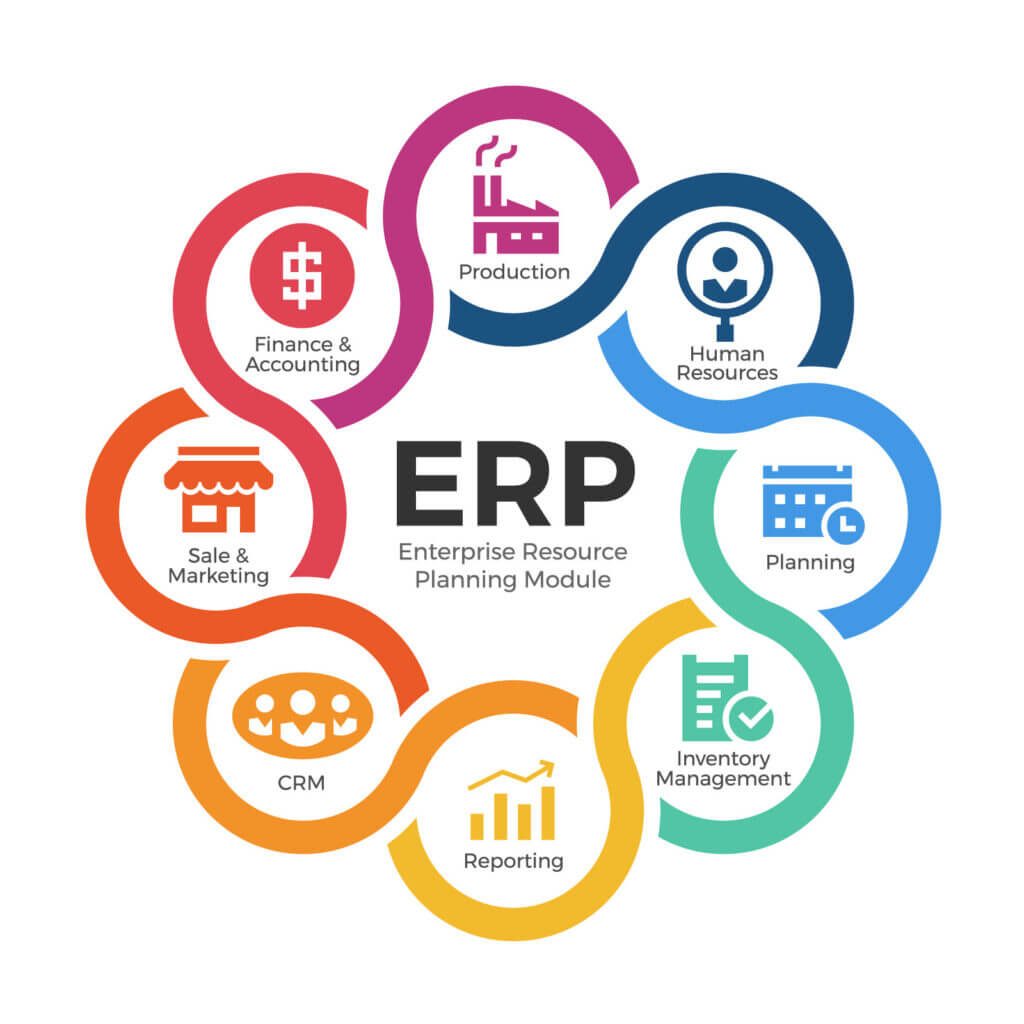
    While traditionally associated with manufacturing, finance, and supply chain operations, modern ERP systems have evolved to encompass a broader range of functionalities, making them incredibly potent for project-centric organizations. Key modules within an ERP system that are particularly relevant to project management include:

    • Financial Management: General ledger, accounts payable/receivable, budgeting, forecasting, cost accounting.
    • Human Capital Management (HCM): Payroll, talent management, time tracking, employee self-service.
    • Supply Chain Management (SCM): Procurement, inventory management, logistics.
    • Manufacturing/Production: Production planning, quality control, shop floor control (for projects involving production).
    • Customer Relationship Management (CRM): Sales, marketing, customer service (relevant for client-facing projects).
    • Project Management Module: Specifically designed functionalities for project planning, execution, monitoring, and control.

    The power of ERP lies in its ability to centralize data from all these modules into a single, unified database. This eliminates data duplication, ensures data integrity, and provides a "single source of truth" for all business information, including project-related data.

    The Synergy: How ERP Elevates Project Management

    The integration of ERP capabilities with project management functionalities creates a powerful synergy that transforms how projects are planned, executed, and monitored.

    1. Comprehensive Resource Management

    Projects are fundamentally about managing resources – people, equipment, materials, and finances. ERP excels in this area by providing:

    • Human Resource Allocation: Project managers can access real-time data on employee skills, availability, certifications, and current assignments across the entire organization. This allows for optimal team formation, prevents over-allocation, and identifies skill gaps proactively. Integration with HCM modules ensures accurate payroll and benefits tracking for project personnel.
    • Equipment and Asset Management: For projects requiring specialized machinery or tools, ERP tracks asset location, maintenance schedules, utilization rates, and depreciation. This ensures equipment is available when needed, minimizes downtime, and optimizes asset lifecycles.
    • Material Tracking: Through integration with SCM modules, ERP provides visibility into material availability, procurement lead times, inventory levels, and delivery schedules. This is crucial for construction, manufacturing, or R&D projects to avoid delays caused by material shortages.

    2. Robust Financial Management and Budget Control

    Financial oversight is paramount for project success. ERP’s financial modules provide unparalleled control:

    • Real-time Cost Tracking: Every expense related to a project – labor hours, material purchases, subcontractor invoices, travel – is automatically captured and attributed to the specific project. This provides an accurate, real-time view of actual costs versus budgeted costs.
    • Budgeting and Forecasting: Project managers can develop detailed budgets within the ERP system, linked directly to tasks and resources. The system can then generate forecasts based on progress and remaining work, enabling proactive adjustments.
    • Invoice Processing and Expense Management: Automation of invoice approvals and expense reimbursements streamlines financial workflows, reduces administrative burden, and ensures timely payments to vendors and employees.
    • Revenue Recognition: For client-facing projects, ERP helps manage contracts, track progress billing, and ensures accurate revenue recognition in compliance with accounting standards.

    3. Enhanced Project Planning and Scheduling

    While specialized project management software excels in scheduling, ERP provides the crucial context by linking schedules to available resources and budgets:

    • Work Breakdown Structure (WBS): ERP systems facilitate the creation of detailed WBS, breaking down large projects into manageable tasks and sub-tasks.
    • Integrated Scheduling: Project schedules can be directly linked to resource availability from HCM, material delivery from SCM, and budget allocations from finance. This ensures that schedules are realistic and achievable.
    • Critical Path Analysis: Many ERP project modules offer tools for identifying the critical path, helping project managers focus on tasks that directly impact project completion dates.
    • Dependency Management: The system can track dependencies between tasks and alert managers to potential bottlenecks or delays that could impact subsequent activities.

    4. Streamlined Procurement and Supply Chain Management

    For projects heavily reliant on external suppliers and materials, ERP’s SCM capabilities are invaluable:

    • Automated Procurement: From requisitions to purchase orders and goods receipt, the entire procurement process can be automated and tracked within the ERP, ensuring materials are ordered efficiently and arrive on time.
    • Vendor Management: ERP maintains a centralized database of approved vendors, contract terms, and performance history, facilitating better supplier selection and negotiation.
    • Inventory Optimization: For projects requiring a dedicated stock of materials, ERP helps manage inventory levels, reducing holding costs and preventing stockouts.

    5. Proactive Risk Management

    By centralizing data and providing real-time insights, ERP contributes significantly to risk mitigation:

    • Early Warning Systems: Deviations from budget, schedule delays, or resource conflicts are flagged early, allowing project managers to intervene before minor issues escalate into major problems.
    • Data-Driven Decision Making: Access to historical project data and real-time performance metrics enables better risk assessment and the development of more robust contingency plans.
    • Compliance Tracking: For regulated industries, ERP can help ensure projects adhere to industry standards and regulatory requirements by embedding compliance checks into workflows.

    6. Improved Collaboration and Communication

    ERP systems act as a central hub for all project-related information, fostering better collaboration:

    • Single Source of Truth: All project stakeholders access the same, up-to-date data, eliminating confusion and ensuring everyone is working with accurate information.
    • Document Management: Project documents, plans, contracts, and communications can be stored and managed within the ERP, making them easily accessible and version-controlled.
    • Workflow Automation: Automated approval workflows for tasks, expenses, and change requests streamline communication and accelerate decision-making.

    7. Powerful Reporting and Analytics

    The integrated nature of ERP allows for unparalleled reporting capabilities:

    • Real-time Dashboards: Project managers and stakeholders can view customizable dashboards displaying key performance indicators (KPIs) such as budget vs. actuals, schedule adherence, resource utilization, and risk status.
    • Comprehensive Reporting: ERP can generate a wide range of reports, from detailed financial statements to summary project status reports, tailored to different audiences.
    • Predictive Analytics: Leveraging historical project data, some advanced ERP systems can offer predictive analytics to forecast future performance, identify potential risks, and optimize resource allocation for upcoming projects.

    Key Benefits of Integrating ERP with Project Management

    Beyond the specific functionalities, the overarching benefits of using ERP for project management are transformative:

    1. Enhanced Visibility and Transparency: A unified view of all project aspects – financial, operational, and resource-related – empowers stakeholders with complete transparency.
    2. Improved Decision-Making: Real-time, accurate data enables faster and more informed decisions, leading to better project outcomes.
    3. Increased Efficiency and Productivity: Automation of routine tasks, streamlined workflows, and optimized resource allocation significantly boost operational efficiency.
    4. Better Resource Utilization: Optimal deployment of human, material, and financial resources across multiple projects reduces waste and maximizes ROI.
    5. Accurate Financial Control: Precise tracking of costs, revenues, and budgets ensures projects remain financially viable and profitable.
    6. Reduced Risks: Early identification of potential issues, coupled with data-driven insights, helps mitigate risks effectively.
    7. Standardization and Best Practices: ERP encourages the adoption of standardized processes and best practices across all projects, improving consistency and quality.
    8. Scalability: As organizations grow and project portfolios expand, an ERP system can scale to accommodate increasing complexity and data volumes.

    Challenges and Considerations for Implementation

    Despite the myriad benefits, implementing an ERP system for project management is a significant undertaking that comes with its own set of challenges:

    1. High Initial Cost: ERP systems, especially enterprise-grade solutions, require substantial investment in software licenses, hardware, implementation services, and training.
    2. Complexity of Implementation: Integrating diverse business processes and migrating existing data can be a complex, time-consuming, and resource-intensive process.
    3. Data Migration: Ensuring the accurate and complete migration of historical project data, financial records, and resource information can be challenging.
    4. User Adoption and Training: Resistance to change and a steep learning curve can hinder user adoption. Adequate training and change management strategies are crucial.
    5. Customization vs. Standard Features: While customization can tailor the ERP to specific needs, it can also increase costs, complexity, and make future upgrades more difficult. Balancing specific requirements with out-of-the-box functionalities is key.
    6. Vendor Lock-in: Choosing an ERP vendor is a long-term commitment, and switching can be disruptive and costly.
    7. Data Security and Privacy: Centralizing sensitive project and financial data necessitates robust security measures and compliance with data protection regulations.

    To overcome these challenges, organizations must conduct thorough planning, secure executive sponsorship, involve key stakeholders throughout the process, and partner with experienced implementation specialists.

    Choosing the Right ERP Solution for Project Management

    Selecting an ERP system is a strategic decision. Organizations should consider:

    • Specific Project Management Needs: Identify the critical functionalities required (e.g., strong financial integration, complex resource scheduling, specific industry compliance).
    • Industry Fit: Some ERPs are tailored to specific industries (e.g., construction, engineering, IT services) and offer specialized project management modules.
    • Scalability: Ensure the system can grow with the organization’s future project portfolio and business needs.
    • Integration Capabilities: Assess how well the ERP integrates with other existing systems and tools.
    • User-Friendliness: An intuitive interface promotes higher user adoption and reduces training overhead.
    • Vendor Reputation and Support: Evaluate the vendor’s track record, customer support, and commitment to ongoing development.
    • Cloud vs. On-premise: Cloud-based ERP offers flexibility, lower upfront costs, and easier maintenance, while on-premise provides more control over data and customization.

    The Future of ERP in Project Management

    The evolution of ERP tools for project management is far from over. Future trends include:

    • Artificial Intelligence (AI) and Machine Learning (ML): For predictive analytics, risk assessment, automated resource allocation, and intelligent forecasting based on historical data.
    • Internet of Things (IoT) Integration: Connecting physical assets on project sites (e.g., machinery, sensors) to the ERP for real-time tracking, performance monitoring, and predictive maintenance.
    • Advanced Automation: Further automation of project workflows, from task assignment to progress reporting and invoice processing.
    • Mobile Accessibility: Enhanced mobile applications for project managers and team members to access data, update tasks, and communicate on the go.
    • Blockchain for Transparency and Security: Potentially used for secure contract management, payment processing, and supply chain transparency in complex, multi-party projects.

    Conclusion

    ERP tools have fundamentally reshaped the landscape of project management, transforming it from a collection of disparate tasks into a seamlessly integrated, data-driven discipline. By centralizing critical information, automating processes, and providing real-time visibility across all project facets, ERP empowers organizations to execute projects with unprecedented efficiency, control, and strategic alignment.

    While the implementation of an ERP system for project management presents its own set of challenges, the long-term benefits of enhanced decision-making, optimized resource utilization, accurate financial control, and improved collaboration far outweigh the initial hurdles. As projects continue to grow in complexity and strategic importance, the synergy between ERP and project management will remain a cornerstone for organizations striving to achieve their objectives and gain a competitive edge in an increasingly dynamic global economy. Embracing this powerful integration is not merely an operational upgrade; it is a strategic imperative for sustained success.

  • The Unveiling of Custom ERP Software Development Costs: A Comprehensive Guide

    The Unveiling of Custom ERP Software Development Costs: A Comprehensive Guide

    The Unveiling of Custom ERP Software Development Costs: A Comprehensive Guide

    The Unveiling of Custom ERP Software Development Costs: A Comprehensive Guide

    In today’s dynamic business landscape, organizations constantly seek ways to streamline operations, enhance efficiency, and gain a competitive edge. While off-the-shelf Enterprise Resource Planning (ERP) solutions offer a quick deployment path, they often fall short in addressing the unique, intricate needs of specific businesses. This is where custom ERP software development steps in, offering a tailored solution designed to fit an organization like a glove. However, the decision to embark on a custom ERP journey invariably brings a significant question to the forefront: "How much will it cost?"

    The answer, unfortunately, is rarely simple. Custom ERP software development costs are not a fixed figure but rather a complex interplay of numerous variables, ranging from the scope of functionality and chosen technology stack to the development team’s location and ongoing maintenance. This comprehensive guide aims to demystify these costs, breaking down the factors that influence them and providing insights to help businesses make informed decisions.

    Why Choose Custom ERP in the First Place?

    Before delving into costs, it’s crucial to understand the compelling reasons businesses opt for custom ERP, as these benefits often justify the investment:

    1. Tailored Functionality: Custom ERP is built from the ground up to match specific business processes, workflows, and industry requirements, eliminating the need for workarounds or compromises.
    2. Competitive Advantage: By optimizing unique processes, custom ERP can provide a distinct operational and strategic advantage over competitors relying on generic solutions.
    3. Scalability and Flexibility: A custom solution can be designed to scale precisely with business growth and adapt to future changes, without being constrained by vendor roadmaps.
    4. Seamless Integration: It can be seamlessly integrated with existing legacy systems, proprietary software, and third-party tools, creating a unified ecosystem.
    5. Ownership and Control: Businesses gain full ownership of the software, allowing for greater control over features, security, data, and future enhancements.
    6. Elimination of Licensing Fees: While upfront development costs are higher, businesses avoid recurring per-user or module-based licensing fees often associated with commercial ERPs.

    The Core Pillars of Custom ERP Development Cost

    The total cost of a custom ERP solution is an aggregation of various components. Understanding each of these pillars is key to forecasting a realistic budget.

    1. Scope and Complexity of Features

    This is arguably the most significant cost driver. The more modules, features, and intricate functionalities an ERP requires, the higher the development effort and, consequently, the cost.

    • Number of Modules: A typical ERP system might include modules for Finance (General Ledger, Accounts Payable/Receivable), Human Resources (HRM, Payroll), Supply Chain Management (Inventory, Procurement, Logistics), Customer Relationship Management (CRM), Manufacturing (MRP), Project Management, Business Intelligence, and more. Each additional module represents a substantial chunk of development work.
    • Depth of Functionality within Modules: Even within a single module, the complexity can vary wildly. A basic inventory management system might track stock levels, while an advanced one might include multi-warehouse management, demand forecasting, batch tracking, serial number management, and integration with automated storage and retrieval systems.
    • User Roles and Permissions: Complex role-based access control, with granular permissions for different user groups, adds significant development and testing effort.
    • Reporting and Analytics: Basic predefined reports are less costly than dynamic, customizable dashboards with advanced analytical capabilities and predictive modeling.
    • Workflow Automation: Automating complex, multi-step business processes with conditional logic and approval flows requires careful design and extensive coding.

    Cost Impact: A small ERP with 3-5 core modules and basic functionality might range from $150,000 – $500,000. A medium-sized ERP with 6-10 modules and moderate complexity could be $500,000 – $1,500,000. A large, enterprise-grade custom ERP with extensive features, complex integrations, and advanced analytics can easily exceed $1,500,000 and go well beyond $5,000,000.

    2. Integrations with Existing Systems

    Most businesses don’t operate in a vacuum. A new custom ERP often needs to communicate seamlessly with existing software, which can range from accounting software and payment gateways to e-commerce platforms, shipping APIs, IoT devices, or legacy systems.

    • Number of Integrations: Each integration point requires dedicated development, testing, and maintenance.
    • Complexity of Integrations: Simple one-way data transfers are less costly than real-time, bi-directional synchronization with complex data mapping and error handling mechanisms.
    • API Availability and Quality: Integrating with systems that have well-documented, robust APIs is generally easier and cheaper than those requiring custom API development or workarounds.
    • Legacy System Challenges: Integrating with older, less flexible legacy systems can be particularly challenging and expensive due to outdated technologies, poor documentation, and lack of modern APIs.

    Cost Impact: Each significant integration can add anywhere from $5,000 to $50,000+ depending on its complexity.

    3. Technology Stack and Infrastructure

    The choice of programming languages, frameworks, databases, and deployment environment significantly impacts costs.

    • Programming Languages: Some languages (e.g., Python, PHP) might have a larger pool of developers and open-source resources, potentially lowering development costs compared to niche or proprietary languages.
    • Databases: Relational databases (e.g., PostgreSQL, MySQL, SQL Server, Oracle) are common, but the choice can influence licensing costs (e.g., Oracle can be very expensive). NoSQL databases (e.g., MongoDB, Cassandra) might be chosen for specific data handling needs.
    • Cloud vs. On-Premise:
      • Cloud (AWS, Azure, GCP): Offers scalability, flexibility, and reduced upfront hardware costs, but incurs ongoing subscription fees and requires expertise in cloud architecture and security.
      • On-Premise: Requires significant upfront investment in hardware, data centers, and IT staff for maintenance, security, and upgrades.
    • Security Requirements: Implementing robust security measures, including data encryption, access controls, compliance certifications (e.g., GDPR, HIPAA), and regular security audits, adds to development and operational costs.

    Cost Impact: While the technology stack itself doesn’t have a direct line item for "cost," it influences developer rates, infrastructure expenses, and ongoing maintenance. Cloud infrastructure costs can range from hundreds to tens of thousands of dollars per month depending on usage and scale.

    4. Development Team Size, Expertise, and Location

    The people building the ERP are a primary cost driver.

    • Team Roles: A typical custom ERP development team includes:
      • Project Manager: Oversees the project, manages timelines, budget, and communication.
      • Business Analyst: Gathers requirements, defines scope, and translates business needs into technical specifications.
      • Solution Architect: Designs the overall system architecture.
      • UI/UX Designer: Creates intuitive and user-friendly interfaces.
      • Back-end Developers: Build the server-side logic, database, and APIs.
      • Front-end Developers: Develop the user interface and client-side interactions.
      • QA Engineers (Testers): Ensure quality, identify bugs, and validate functionality.
      • DevOps Engineer: Manages deployment, infrastructure, and continuous integration/delivery.
    • Expertise Level: Senior developers, architects, and business analysts command higher rates than junior or mid-level personnel. Complex ERPs demand experienced professionals.
    • Team Location (Hourly Rates): This is a critical factor:
      • North America/Western Europe: Hourly rates typically range from $100 – $250+.
      • Eastern Europe: Hourly rates generally fall between $40 – $90.
      • Asia (India, Philippines): Hourly rates can be as low as $20 – $50.
      • In-House Team: Incurs salaries, benefits, office space, and recruitment costs, but offers maximum control.

    Cost Impact: A full-stack developer’s hourly rate can range from $20 (offshore) to $200+ (onshore). A medium-sized ERP project requiring 5-10 full-time equivalent (FTE) team members for 12-24 months will have significant personnel costs.

    5. UI/UX Design

    A well-designed, intuitive user interface (UI) and user experience (UX) are crucial for user adoption and productivity. Poor design can lead to frustration and resistance, undermining the investment.

    • Research and Analysis: User interviews, persona creation, workflow analysis.
    • Wireframing and Prototyping: Creating blueprints and interactive mockups.
    • Visual Design: Crafting the aesthetics, branding, and visual elements.
    • Usability Testing: Gathering feedback and iterating on designs.

    Cost Impact: Comprehensive UI/UX design for a custom ERP can add $20,000 to $100,000+, depending on the number of screens and complexity.

    6. Data Migration

    Moving existing data from old systems (spreadsheets, legacy databases, other ERPs) to the new custom ERP is a complex and critical task.

    • Volume and Complexity of Data: Large volumes of disparate data sources require more effort.
    • Data Cleaning and Transformation: Old data often contains inconsistencies, duplicates, or requires reformatting to fit the new ERP’s structure. This "data cleansing" is time-consuming but vital.
    • Legacy System Compatibility: Extracting data from archaic systems can be particularly challenging.

    Cost Impact: Data migration can range from $10,000 to $100,000+, heavily dependent on data volume, quality, and source systems.

    7. Testing and Quality Assurance (QA)

    Rigorous testing is non-negotiable for an ERP system, as errors can have severe operational and financial consequences.

    • Types of Testing: Unit testing, integration testing, system testing, user acceptance testing (UAT), performance testing, security testing.
    • Automation: Automated testing reduces manual effort in the long run but requires initial investment in scripting and tools.
    • Bug Fixing and Iteration: The QA process involves identifying bugs, reporting them, and re-testing after fixes, which adds to the overall development cycle.

    Cost Impact: QA efforts typically account for 15-25% of the total development cost.

    8. Project Management and Business Analysis

    These roles are often grouped with development but are distinct and essential. Effective project management keeps the project on track, within budget, and mitigates risks. Business analysis ensures the solution genuinely meets business needs.

    Cost Impact: These services can account for 10-20% of the total project cost.

    9. Training and Documentation

    Once the ERP is built, users need to know how to use it.

    • User Manuals and Guides: Creating comprehensive documentation for various user roles.
    • Training Sessions: Conducting workshops and training programs for employees.
    • Admin Guides: Documentation for IT staff managing the system.

    Cost Impact: This can range from $5,000 to $50,000+ depending on the complexity of the system and the number of users.

    10. Post-Deployment Support and Maintenance

    Custom ERP is a living system that requires ongoing care.

    • Bug Fixes and Patches: Addressing any issues that arise after launch.
    • Security Updates: Keeping the system secure against new vulnerabilities.
    • Performance Monitoring: Ensuring the system runs optimally.
    • Feature Enhancements: Developing new features or modifying existing ones as business needs evolve.
    • Hosting and Infrastructure Costs: Ongoing cloud subscriptions or on-premise hardware maintenance.
    • SLA (Service Level Agreement): Defines the level of support provided by the development vendor.

    Cost Impact: Ongoing support and maintenance typically cost 15-25% of the initial development cost annually.

    Hidden Costs and Potential Pitfalls

    Beyond the direct development expenses, several "hidden" costs or pitfalls can inflate the budget:

    • Scope Creep: Uncontrolled addition of features or requirements after the project has started, leading to delays and increased costs.
    • Poor Requirements Gathering: Ambiguous or incomplete initial requirements lead to rework, redesigns, and extended timelines.
    • Vendor Lock-in: If not properly managed, reliance on a single vendor for future enhancements or support can become costly.
    • Insufficient Testing: Rushing QA can lead to critical bugs emerging post-launch, which are far more expensive to fix.
    • Resistance to Change: Employee reluctance to adopt the new system can impact productivity and necessitate additional training or change management efforts.
    • Underestimated Data Migration Complexity: This often turns out to be more time-consuming and problematic than initially anticipated.

    Strategies to Optimize Custom ERP Development Costs

    While custom ERP is an investment, businesses can employ strategies to manage and optimize costs:

    1. Define Clear Requirements: Invest heavily in the discovery and requirements gathering phase. A detailed functional specification minimizes rework.
    2. Prioritize Features (MVP Approach): Start with a Minimum Viable Product (MVP) that covers core functionalities. Launch it, gather feedback, and then iteratively add more features in subsequent phases.
    3. Leverage Existing Solutions/Libraries: Don’t reinvent the wheel. Utilize open-source libraries, frameworks, or existing modules where appropriate.
    4. Consider Offshore/Nearshore Teams: While communication and cultural differences need to be managed, leveraging talent from regions with lower hourly rates can significantly reduce costs.
    5. Phased Development: Break down the project into manageable phases. This allows for better cost control, faster delivery of core functionalities, and flexibility to adapt.
    6. Strong Project Management: A competent project manager is crucial for keeping the project on track, managing resources, and mitigating risks.
    7. Focus on Reusability: Design the architecture with reusability in mind, especially for common components or services.
    8. Automate Testing: While an upfront investment, automated testing reduces long-term QA costs and improves software quality.

    Conclusion: A Strategic Investment, Not Just an Expense

    Estimating the cost of custom ERP software development is a challenging but essential exercise. As we’ve seen, it’s a multi-faceted calculation influenced by a wide array of technical, functional, and operational factors. There’s no single "average" cost because each custom ERP is, by definition, unique.

    For businesses contemplating this path, the key is to approach it as a strategic investment. This involves thorough planning, detailed requirements analysis, careful vendor selection, and a clear understanding of both the upfront development costs and the long-term total cost of ownership (TCO). By meticulously breaking down the project into its constituent parts and understanding the cost drivers associated with each, organizations can build a realistic budget, mitigate risks, and ultimately realize the transformative benefits of a perfectly tailored ERP solution.

    Remember, the goal isn’t necessarily to find the cheapest option, but the one that offers the best value—a robust, scalable, and efficient system that empowers your business for years to come.

  • Navigating the Labyrinth: A Comprehensive Comparison of ERP Software Pricing

    Navigating the Labyrinth: A Comprehensive Comparison of ERP Software Pricing

    In today’s rapidly evolving business landscape, Enterprise Resource Planning (ERP) software has become an indispensable tool for organizations seeking to streamline operations, enhance efficiency, and gain a competitive edge. From managing financials and human resources to optimizing supply chains and manufacturing processes, ERP systems integrate disparate functions into a unified platform. However, the journey to implementing an ERP solution often begins with a significant hurdle: understanding and comparing its complex pricing structures.

    Unlike purchasing a standard off-the-shelf product, ERP software pricing is rarely a fixed figure. It’s a multifaceted calculation influenced by numerous variables, making a direct apples-to-apples comparison incredibly challenging. This article aims to demystify the intricacies of ERP software pricing, delve into the various models and factors that drive costs, provide insights into total cost of ownership (TCO), and offer practical advice for businesses navigating this critical investment.

    The Fundamental ERP Pricing Models

    At a high level, ERP software typically follows two primary licensing and deployment models, each with distinct cost implications:

    1. On-Premise Licensing:

      • Description: In this traditional model, the ERP software is installed and run on a company’s own servers and infrastructure. The organization purchases a perpetual license, granting them the right to use the software indefinitely.
      • Cost Structure:
        • Upfront License Fee: This is often a substantial one-time payment for the software itself, varying based on the number of users, modules purchased, and the vendor.
        • Hardware & Infrastructure: Companies must invest in servers, networking equipment, data centers, and ensure robust security measures.
        • Implementation & Customization: Significant costs are associated with installation, configuration, data migration, and tailoring the software to specific business processes.
        • IT Staffing: A dedicated IT team is required to manage, maintain, and troubleshoot the system.
        • Annual Maintenance & Support: Typically 15-22% of the initial license fee, this recurring cost covers software updates, patches, and technical support.
      • Pros: Full control over data and customization, no reliance on internet connectivity for core functions, potentially lower long-term costs if the system is used for many years without significant upgrades.
      • Cons: High initial capital expenditure (CapEx), ongoing operational costs for infrastructure and IT, slower scalability, potential for technological obsolescence if not regularly updated.
    2. Cloud-Based (SaaS) Subscriptions:

      • Description: Software as a Service (SaaS) ERP solutions are hosted by the vendor and accessed over the internet, typically through a web browser. Companies subscribe to the service, paying recurring fees for its use.
      • Cost Structure:
        • Subscription Fees: These are recurring payments (monthly or annually) based on the number of users, specific modules, data storage, or tiered usage.
        • Lower Upfront Costs: Eliminates the need for significant hardware investment and often reduces initial implementation complexity.
        • Vendor Handles Infrastructure: The ERP provider manages servers, maintenance, security, and upgrades.
        • Implementation & Customization: While generally lower than on-premise, these costs still exist for configuration, data migration, and integrating with other systems.
        • Support & Upgrades: Basic support and software upgrades are usually included in the subscription fee, though premium support tiers may incur additional charges.
      • Pros: Lower initial CapEx, predictable operating expenses (OpEx), scalability (easily add/remove users or modules), accessibility from anywhere, automatic updates and maintenance, reduced IT burden.
      • Cons: Reliance on internet connectivity, less control over data and infrastructure, limited customization options in some cases, potentially higher long-term costs if subscription fees accumulate over many years, vendor lock-in.

    Key Factors Influencing ERP Pricing

    Beyond the fundamental deployment model, numerous variables significantly impact the final cost of an ERP system:

    1. Number and Type of Users:

      • Named Users: Each individual user account requires a separate license or subscription. This is common for most users who frequently interact with the system.
      • Concurrent Users: A fixed number of licenses that can be used simultaneously by different users. If a company has 100 employees but only 20 need to be logged in at any given time, 20 concurrent user licenses would suffice. This model can be cost-effective for organizations with shift-based work or infrequent users.
      • User Tiers: Some vendors offer different user tiers (e.g., full user, limited user, read-only user) with varying levels of access and corresponding price points.
      • Impact: User count is often the most direct driver of recurring SaaS costs and a major component of on-premise license fees.
    2. Modules and Functionality:

      • ERP systems are typically modular, allowing businesses to select only the functionalities they need. Common modules include:
        • Financial Management (General Ledger, Accounts Payable/Receivable, Budgeting)
        • Human Resources (HRM, Payroll, Talent Management)
        • Supply Chain Management (SCM, Inventory, Procurement, Logistics)
        • Manufacturing (MRP, Production Planning, Quality Control)
        • Customer Relationship Management (CRM)
        • Project Management
        • Business Intelligence (BI) & Analytics
      • Impact: The more modules and advanced functionalities a company requires, the higher the license or subscription cost. Vendors often offer core bundles with add-on pricing for specialized modules or industry-specific functionalities.
    3. Customization and Integration:

      • Customization: Tailoring the software to specific, unique business processes that are not supported out-of-the-box. This can involve custom reports, workflows, fields, or even bespoke module development.
      • Integration: Connecting the ERP system with other existing software solutions (e.g., e-commerce platforms, legacy systems, specialized industry software).
      • Impact: Both customization and integration can significantly drive up implementation costs. Extensive customization can also make future upgrades more complex and expensive, especially for SaaS solutions which thrive on standardization.
    4. Vendor Type and Tier:

      • Tier 1 (Enterprise Level): Vendors like SAP (S/4HANA), Oracle (Fusion Cloud ERP), and Microsoft (Dynamics 365 for Finance and Operations) target large enterprises with complex global operations. These systems offer unparalleled breadth and depth of functionality, but come with the highest price tags, often ranging from hundreds of thousands to millions of dollars annually.
      • Tier 2 (Mid-Market): Vendors such as Infor, Epicor, Sage X3, Acumatica, and Microsoft Dynamics 365 Business Central cater to medium-sized businesses. They offer robust functionality at a more accessible price point, typically ranging from tens of thousands to hundreds of thousands of dollars per year.
      • Tier 3/SMB (Small to Medium Business): Solutions like NetSuite, Odoo, Sage Intacct, and QuickBooks Enterprise (for very small businesses) are designed for smaller organizations with simpler needs. These are generally the most affordable, starting from a few thousand dollars per month/year, depending on scale.
      • Open-Source ERP: (e.g., Odoo Community, ERPNext). While the software license itself might be free, businesses still incur significant costs for implementation, customization, hosting, maintenance, and support, often requiring specialized developer expertise.
    5. Data Volume and Storage:

      • For SaaS solutions, the amount of data stored and processed can influence pricing, with higher volumes leading to increased subscription costs. This is less of a direct cost factor for on-premise, but still impacts hardware requirements.
    6. Support and Service Level Agreements (SLAs):

      • While basic support is often included, premium support packages offering faster response times, dedicated account managers, or 24/7 availability come at an additional cost. For on-premise systems, annual maintenance contracts cover these services.
    7. Industry-Specific Requirements:

      • Certain industries (e.g., healthcare, manufacturing, retail) have unique regulatory compliance, reporting, or operational requirements. ERP solutions tailored for these industries often include specialized modules or functionalities, which can command a premium.

    Beyond the License: Understanding Total Cost of Ownership (TCO)

    Focusing solely on the ERP software license or subscription fee is a common mistake that can lead to significant budget overruns. The true cost of an ERP system is its Total Cost of Ownership (TCO), which encompasses all direct and indirect expenses incurred over the system’s lifespan.

    Key components of TCO include:

    1. Implementation Costs:

      • Consulting Fees: This is often the largest component, sometimes exceeding the software license cost. ERP consultants assist with project planning, business process re-engineering, configuration, testing, and go-live support. Their rates vary widely based on experience and region.
      • Project Management: Internal or external resources dedicated to overseeing the implementation project.
      • Data Migration: Extracting, cleansing, transforming, and loading data from old systems into the new ERP. This can be complex and time-consuming.
      • Testing: Rigorous testing of all modules, integrations, and workflows.
    2. Training Costs:

      • User adoption is crucial for ERP success. Training for end-users, power users, and system administrators is essential and can be a significant expense, whether conducted internally or by external trainers.
    3. Hardware and Infrastructure Costs (Primarily On-Premise):

      • Servers, storage, networking equipment, operating systems, database licenses, backup solutions, and physical data center space.
      • Electricity, cooling, and physical security for the data center.
    4. IT Staffing Costs (More Prominent for On-Premise):

      • Salaries for IT personnel responsible for system administration, database management, network maintenance, security, and helpdesk support. Even with SaaS, some internal IT support for integrations and user management is often needed.
    5. Customization and Integration Development:

      • Costs associated with developing custom features, reports, or integrations with other business applications. This can include developer salaries or consultant fees.
    6. Upgrade and Future Development Costs:

      • For on-premise systems, major version upgrades can be substantial projects, requiring new licenses, implementation, and testing. For SaaS, upgrades are typically included, but new modules or advanced features may incur additional subscription costs.
    7. Opportunity Costs:

      • While difficult to quantify, these include potential loss of productivity during the implementation phase, staff time diverted from core tasks, and potential business disruption.

    Navigating the ERP Pricing Landscape: Tips for Buyers

    Given the complexity, businesses must adopt a strategic approach when evaluating ERP pricing:

    1. Clearly Define Your Requirements: Before even looking at vendors, conduct a thorough internal assessment of your current processes, pain points, and future needs. What modules are essential? How many users? What integrations are critical? A clear requirements document (RFP) will enable vendors to provide more accurate quotes.

    2. Focus on Total Cost of Ownership (TCO): Always request a comprehensive TCO breakdown from vendors, not just the software license fee. This should include implementation, customization, training, ongoing support, and any other potential costs over a 3-5 year period.

    3. Understand the Deployment Model Implications: Carefully weigh the pros and cons of on-premise versus cloud. Consider your budget, IT capabilities, desired level of control, and long-term scalability needs.

    4. Get Multiple Quotes: Engage with several vendors (at least 3-5) that align with your requirements and company size. This will provide a broader perspective on pricing and allow for negotiation.

    5. Negotiate Aggressively: ERP pricing is often flexible. Don’t be afraid to negotiate on license fees, implementation services, and support contracts. Leverage competitive offers from other vendors.

    6. Beware of "Hidden" Costs: Ask probing questions about every potential charge. Are upgrades included? What about data migration? Is there a limit on support tickets? Are there additional costs for specific connectors or APIs?

    7. Consider a Phased Implementation: If budget is a major concern, consider implementing core modules first and then adding more advanced functionalities in subsequent phases. This allows for better budget management and smoother user adoption.

    8. Leverage Free Trials and Demos: Most SaaS ERP vendors offer free trials or detailed demos. Use these opportunities to assess the system’s fit and identify any potential gaps or unexpected costs.

    9. Talk to References: Speak with existing customers of the vendors you are considering. Ask them about their actual TCO, implementation experience, and satisfaction with support.

    10. Factor in Scalability: Choose a solution that can grow with your business. Adding users or modules in the future should be straightforward and cost-effective, not a complete overhaul.

    Conclusion

    The decision to invest in an ERP system is one of the most significant strategic choices a business can make. While the initial sticker shock of ERP pricing can be daunting, understanding the underlying cost drivers and embracing a Total Cost of Ownership perspective is paramount. By meticulously defining needs, thoroughly evaluating vendors, and skillfully negotiating, organizations can secure an ERP solution that not only optimizes their operations but also delivers substantial long-term value and a strong return on investment. The labyrinth of ERP pricing, while complex, can be successfully navigated with due diligence, strategic planning, and a clear vision for the future of your business.

  • The Transformative Power of ERP: Unlocking Comprehensive Business Benefits

    The Transformative Power of ERP: Unlocking Comprehensive Business Benefits

    The Transformative Power of ERP: Unlocking Comprehensive Business Benefits

    The Transformative Power of ERP: Unlocking Comprehensive Business Benefits

    In today’s dynamic and hyper-competitive business landscape, organizations are constantly seeking ways to optimize operations, enhance efficiency, and gain a decisive edge. The sheer complexity of managing disparate functions—from finance and human resources to manufacturing and supply chain—often leads to silos, inefficiencies, and a lack of real-time visibility. This is where Enterprise Resource Planning (ERP) systems emerge not just as a software solution, but as a strategic imperative for modern enterprises.

    An ERP system integrates all facets of an operation, including product planning, development, manufacturing, sales and marketing, in a single database, application, and user interface. Far from being a mere IT tool, ERP acts as the central nervous system of a business, providing a unified platform that connects departments, streamlines processes, and delivers actionable insights. The benefits of implementing such a comprehensive system are profound and far-reaching, touching every aspect of an organization’s performance and paving the way for sustainable growth and innovation.

    1. Enhanced Operational Efficiency and Productivity

    One of the most immediate and tangible benefits of an ERP system is the significant boost in operational efficiency and productivity. By automating repetitive tasks, standardizing workflows, and integrating disparate functions, ERP drastically reduces manual effort and the potential for human error.

    • Process Automation: ERP systems automate routine processes like order processing, invoice generation, payroll, inventory management, and data entry. This frees up employees from tedious, time-consuming tasks, allowing them to focus on more strategic, value-added activities that require critical thinking and problem-solving.
    • Streamlined Workflows: With a unified system, information flows seamlessly across departments. For instance, a sales order can automatically trigger inventory checks, production scheduling, and shipping logistics, all without manual intervention or data re-entry. This eliminates bottlenecks, accelerates cycle times, and ensures a smoother progression of tasks from inception to completion.
    • Reduced Manual Errors: Manual data entry across multiple, disconnected systems is a breeding ground for errors. An ERP system centralizes data entry, ensuring that information is entered once and then propagated throughout the system. This drastically reduces inconsistencies, discrepancies, and the time spent correcting mistakes, leading to higher data accuracy and reliability.
    • Optimized Resource Utilization: By providing a clear overview of resources—be it human capital, machinery, or raw materials—ERP helps businesses allocate them more effectively. Production schedules can be optimized to minimize downtime, and labor can be deployed where it’s most needed, leading to better utilization of all available assets.

    2. Superior Data Visibility and Informed Decision-Making

    Perhaps the most strategic benefit of an ERP system is its ability to provide a "single source of truth" for all business data. This unparalleled data visibility empowers management with the insights needed to make faster, more informed, and ultimately better decisions.

    • Centralized Database: All operational data, from sales figures and customer interactions to inventory levels and financial reports, resides in a single, integrated database. This eliminates data silos and ensures that everyone across the organization is working with the same, up-to-date information.
    • Real-time Insights: Unlike legacy systems that often rely on batch processing or periodic updates, modern ERP systems offer real-time data. This means that managers can access current performance metrics, inventory levels, sales trends, and financial standings at any given moment. This immediacy is crucial for responding quickly to market changes, production issues, or customer demands.
    • Comprehensive Reporting and Analytics: ERP systems come equipped with powerful reporting and analytical tools. Customizable dashboards allow users to visualize key performance indicators (KPIs) relevant to their roles, from daily sales performance to monthly expenditure trends. Advanced analytics capabilities can uncover patterns, forecast future trends, and identify areas for improvement or potential risks, transforming raw data into actionable intelligence.
    • Strategic Planning: With a holistic view of the business, leaders can develop more effective long-term strategies. They can identify opportunities for market expansion, optimize product portfolios, and make data-driven decisions about investments and resource allocation, confident that their strategies are grounded in accurate, comprehensive data.

    3. Significant Cost Reduction and Optimized Resource Management

    While the initial investment in an ERP system can be substantial, the long-term cost savings and efficiency gains often provide a compelling return on investment (ROI).

    • Reduced Operational Costs: By streamlining processes and automating tasks, ERP reduces the need for manual labor in certain areas, potentially lowering staffing costs. Furthermore, improved efficiency in areas like inventory management minimizes waste, obsolescence, and storage costs.
    • Improved Inventory Control: ERP provides precise, real-time tracking of inventory levels. This allows businesses to maintain optimal stock levels, reducing carrying costs associated with excess inventory while simultaneously preventing stockouts that can lead to lost sales and customer dissatisfaction. Just-in-time (JIT) inventory strategies become more feasible and effective with ERP.
    • Better Vendor Management and Procurement: With integrated procurement modules, ERP enables better tracking of supplier performance, pricing, and contract terms. This data empowers businesses to negotiate more favorable deals, consolidate purchases, and identify cost-saving opportunities in their supply chain.
    • Consolidated IT Infrastructure: Replacing multiple disparate systems with a single ERP solution can significantly reduce IT infrastructure costs. This includes fewer software licenses, less hardware to maintain, and a simplified IT support structure. Cloud-based ERP (SaaS) solutions further reduce these costs by offloading infrastructure management to the vendor.

    4. Enhanced Customer Satisfaction and Relationship Management

    In today’s customer-centric world, delivering exceptional customer experience is paramount. ERP plays a critical role in enabling businesses to meet and exceed customer expectations.

    • Faster Order Fulfillment: By integrating sales, inventory, and logistics, ERP accelerates the order-to-cash cycle. Orders can be processed more quickly, inventory can be allocated efficiently, and shipments can be tracked in real-time, leading to faster and more reliable delivery times.
    • Improved Customer Service: With a 360-degree view of the customer—including purchase history, interactions, and service requests—customer service representatives can provide more personalized and effective support. They can quickly access relevant information, resolve issues efficiently, and anticipate customer needs, enhancing overall satisfaction.
    • Accurate Information: Customers appreciate transparency. ERP ensures that sales teams have accurate information on product availability, pricing, and delivery schedules, which can be communicated reliably to customers, building trust and reducing misunderstandings.
    • Personalized Marketing and Sales: Integrating ERP with CRM (Customer Relationship Management) functionalities allows businesses to segment customers more effectively, tailor marketing campaigns, and offer personalized product recommendations, leading to higher engagement and sales conversions.

    5. Standardization, Compliance, and Risk Management

    For businesses operating in regulated industries or across multiple geographies, compliance and risk management are critical. ERP systems provide the framework necessary to meet these stringent requirements.

    • Standardized Processes: ERP enforces standardized business processes across all departments and locations. This consistency ensures that operations are performed in a uniform manner, reducing variations and improving quality control.
    • Regulatory Compliance: Many ERP systems are designed with built-in functionalities to help businesses comply with industry-specific regulations (e.g., FDA, GAAP, IFRS, GDPR). They facilitate accurate financial reporting, audit trails, and data privacy controls, making it easier to meet compliance obligations and pass audits.
    • Enhanced Data Security: Centralizing data within a robust ERP system, especially modern cloud-based solutions, typically offers higher levels of security compared to fragmented legacy systems. Access controls, encryption, and regular backups help protect sensitive business information from unauthorized access and cyber threats.
    • Improved Audit Trails: ERP systems automatically record transactions and changes, providing comprehensive audit trails. This transparency is invaluable for internal controls, financial audits, and identifying the source of errors or discrepancies, thereby reducing the risk of fraud and ensuring accountability.
    • Disaster Recovery: Modern ERP solutions, particularly cloud-based ones, often include robust disaster recovery capabilities, ensuring business continuity even in the event of system failures or unforeseen disasters.

    6. Scalability and Business Growth

    As businesses grow, their operational needs evolve and become more complex. ERP systems are designed to be scalable, supporting expansion without requiring a complete overhaul of the IT infrastructure.

    • Supports Expansion: Whether a company is expanding into new markets, launching new product lines, acquiring other businesses, or simply experiencing organic growth, an ERP system can accommodate increased transaction volumes and additional users without significant performance degradation.
    • Flexible Architecture: Many ERP solutions are modular, allowing businesses to add new functionalities (e.g., advanced analytics, IoT integration, e-commerce platforms) as their needs evolve, rather than being locked into a rigid system.
    • Adaptability to New Business Models: ERP can support various business models, from traditional manufacturing and distribution to service-based organizations and e-commerce. Its flexibility allows companies to pivot and adapt to changing market demands or new strategic directions.
    • Global Operations: For multinational corporations, ERP provides the capability to manage operations across different countries, currencies, languages, and legal requirements within a single system, simplifying global management and reporting.

    7. Enhanced Collaboration and Communication

    Breaking down departmental silos is crucial for organizational synergy. ERP fosters a culture of collaboration and improves communication by providing a shared platform for information.

    • Shared Information Platform: All departments have access to the same, consistent data. Sales teams can see inventory levels, production teams can view order backlogs, and finance can track all transactions in real-time. This transparency reduces misunderstandings and improves coordination.
    • Cross-Functional Teamwork: With integrated processes, cross-functional teams can work more effectively together. For example, a new product development team can collaborate with manufacturing, procurement, and marketing all within the ERP environment, ensuring alignment from conception to launch.
    • Improved Internal Communication: By standardizing data and providing clear workflows, ERP reduces the need for constant email exchanges or phone calls to get updates or clarify information, leading to more efficient internal communication.

    8. Competitive Advantage and Innovation

    Ultimately, all the aforementioned benefits converge to give businesses a significant competitive advantage and foster an environment ripe for innovation.

    • Agility and Responsiveness: With real-time data and streamlined processes, businesses can react much faster to market changes, competitor actions, or new opportunities. This agility allows them to stay ahead of the curve.
    • Data-Driven Innovation: By analyzing vast amounts of data, businesses can identify trends, customer preferences, and inefficiencies, which can directly inform product development, service improvements, and new business strategies.
    • Focus on Core Competencies: By automating routine tasks and optimizing operations, ERP frees up human capital to focus on strategic initiatives, research and development, and innovation that truly differentiates the business in the marketplace.
    • Digital Transformation Enabler: ERP is often the backbone of an organization’s digital transformation journey, enabling integration with emerging technologies like Artificial Intelligence (AI), Machine Learning (ML), Internet of Things (IoT), and Blockchain, further enhancing capabilities and opening new avenues for growth.

    Navigating the ERP Journey: Considerations for Success

    While the benefits are compelling, it’s crucial to acknowledge that ERP implementation is a complex undertaking. Success hinges on careful planning, robust execution, and effective change management. Key considerations include:

    • Strategic Alignment: The chosen ERP system must align perfectly with the organization’s strategic goals and unique business processes.
    • Vendor Selection: Partnering with a reputable ERP vendor that offers industry-specific solutions and strong support is vital.
    • Customization vs. Standardization: Striking the right balance between customizing the ERP to fit specific needs and adhering to standard best practices to avoid over-complication.
    • Data Migration: Meticulous planning for migrating historical data from old systems to the new ERP is essential for data integrity.
    • User Training and Adoption: Comprehensive training and strong change management strategies are critical to ensure user acceptance and maximize the system’s potential.
    • Ongoing Support and Optimization: ERP is not a one-time project; continuous support, updates, and optimization are necessary to maintain its effectiveness and derive long-term value.

    Conclusion

    In an era defined by rapid technological advancement and relentless global competition, Enterprise Resource Planning systems are no longer a luxury but a fundamental requirement for businesses aiming for efficiency, growth, and resilience. By integrating core business functions, providing real-time data visibility, streamlining operations, and fostering a culture of informed decision-making, ERP empowers organizations to unlock their full potential. The transformative power of ERP extends beyond mere software installation; it represents a strategic investment in the future, enabling businesses to navigate complexity, adapt to change, and achieve sustainable competitive advantage in the ever-evolving global marketplace. For any enterprise serious about optimizing performance and securing its future, embracing the benefits of a well-implemented ERP system is an undeniable imperative.

  • Navigating the Complexities: The Transformative Power of ERP Software in Logistics and Supply Chain Management

    Navigating the Complexities: The Transformative Power of ERP Software in Logistics and Supply Chain Management

    Navigating the Complexities: The Transformative Power of ERP Software in Logistics and Supply Chain Management

    Navigating the Complexities: The Transformative Power of ERP Software in Logistics and Supply Chain Management

    The global economy is a vast, interconnected web, and at its heart lie logistics and supply chain management (L&SC). From the raw materials extracted from the earth to the finished product delivered to a customer’s doorstep, every step is a delicate dance of coordination, timing, and information exchange. In an era defined by ever-increasing customer expectations, volatile market conditions, and a relentless drive for efficiency, the traditional methods of managing these intricate networks are simply no longer sufficient. This is where Enterprise Resource Planning (ERP) software emerges not just as a tool, but as the central nervous system for modern logistics and supply chain operations.

    ERP systems, at their core, are integrated software suites designed to manage all core business processes, from finance and human resources to manufacturing and sales, within a single, unified system. When applied to logistics and supply chain management, ERP transcends its general business function to become a strategic imperative, offering unparalleled visibility, control, and efficiency across the entire value chain. This article delves deep into the transformative power of ERP software for logistics and supply chain, exploring its key modules, benefits, implementation challenges, critical considerations, and future trends that are reshaping the industry.

    The Symbiotic Relationship: Why ERP is Indispensable for L&SC

    Logistics and supply chain management are inherently complex. They involve a multitude of stakeholders, diverse processes, and a constant flow of goods and information across geographical boundaries. Without a centralized system, this complexity often leads to data silos, inefficiencies, delayed decision-making, and ultimately, higher costs and dissatisfied customers.

    ERP systems address these challenges by providing a holistic view of the entire operation. Instead of disparate systems for inventory, warehousing, transportation, and procurement, ERP integrates these functions into one cohesive platform. This integration fosters real-time data exchange, ensuring that every department operates with the most current and accurate information. For logistics and supply chain professionals, this means moving from reactive problem-solving to proactive strategic planning, enabled by data-driven insights.

    Key ERP Modules and Their Impact on Logistics & Supply Chain

    A robust ERP system designed for L&SC typically comprises several integrated modules, each playing a crucial role in optimizing different facets of the supply chain:

    1. Inventory Management:
      This module is foundational. It provides real-time visibility into inventory levels across all locations, including raw materials, work-in-progress, and finished goods. Key functionalities include:

      • Stock Tracking: Accurate tracking of inventory in multiple warehouses, distribution centers, and even in transit.
      • Demand Forecasting Integration: Using historical data and predictive analytics to anticipate future demand, helping to optimize stock levels and prevent overstocking or stockouts.
      • Reorder Point Management: Automatically triggering purchase orders when stock levels hit predefined minimums.
      • Batch and Lot Tracking: Critical for quality control and recall management, especially in industries like food & beverage or pharmaceuticals.
      • Cycle Counting and Physical Inventory: Streamlining inventory audits and reconciliation.
    2. Warehouse Management System (WMS) Integration:
      Often a specialized module or integrated solution within ERP, WMS optimizes all aspects of warehouse operations:

      • Receiving and Putaway: Efficient processing of incoming goods and directing them to optimal storage locations.
      • Picking and Packing Optimization: Guiding staff through the most efficient picking routes and ensuring accurate order fulfillment.
      • Shipping Management: Generating shipping labels, packing lists, and coordinating with carriers.
      • Space Utilization: Maximizing warehouse capacity through intelligent slotting and storage strategies.
      • Labor Management: Tracking and optimizing warehouse staff productivity.
    3. Transportation Management System (TMS) Integration:
      Another specialized component, TMS focuses on the efficient planning, execution, and optimization of freight movement:

      • Route Optimization: Planning the most cost-effective and time-efficient delivery routes, considering traffic, fuel costs, and delivery windows.
      • Carrier Selection and Management: Identifying and managing relationships with various transportation providers, negotiating rates, and tracking performance.
      • Freight Audit and Payment: Automating the verification of freight invoices against negotiated rates.
      • Load Planning: Maximizing vehicle utilization by optimizing cargo loading.
      • Real-time Tracking: Providing visibility into shipments in transit, crucial for customer service and proactive problem-solving.
    4. Procurement and Supplier Relationship Management (SRM):
      This module manages the entire purchasing process, from requisition to payment:

      • Purchase Order (PO) Management: Creating, tracking, and approving purchase orders.
      • Supplier Management: Maintaining a database of suppliers, tracking their performance, and managing contracts.
      • Strategic Sourcing: Identifying best suppliers and negotiating favorable terms.
      • E-procurement: Automating the purchasing process to reduce manual effort and errors.
      • Invoice Processing: Streamlining the matching of invoices with POs and receipts for payment.
    5. Demand Planning and Forecasting:
      While often integrated with inventory, this module is crucial for strategic supply chain planning:

      • Statistical Forecasting: Utilizing advanced algorithms to predict future demand based on historical sales data, seasonality, and market trends.
      • Sales and Operations Planning (S&OP): Facilitating cross-functional collaboration to align demand forecasts with production and supply plans.
      • Scenario Planning: Allowing businesses to model the impact of different demand fluctuations or market changes.
    6. Order Management:
      Manages the entire customer order lifecycle, from initial inquiry to final delivery:

      • Order Entry and Processing: Efficiently capturing and processing customer orders.
      • Order Fulfillment: Coordinating with inventory and warehouse modules to ensure timely and accurate fulfillment.
      • Order Tracking: Providing customers and internal teams with real-time updates on order status.
      • Returns Management: Streamlining the process for product returns and exchanges (reverse logistics).
    7. Manufacturing Planning and Scheduling:
      Though not directly logistics, this module critically impacts the supply chain by dictating what needs to be sourced and when it needs to be delivered:

      • Material Requirements Planning (MRP): Calculating the raw materials and components needed for production based on demand forecasts and bills of materials (BOMs).
      • Production Scheduling: Optimizing production lines and allocating resources to meet demand efficiently.
      • Shop Floor Control: Monitoring and managing manufacturing processes in real-time.
    8. Financial Management:
      Underpins all L&SC activities by tracking costs, revenues, and profitability:

      • Cost Accounting: Analyzing the cost of goods sold, transportation, warehousing, and other operational expenses.
      • Budgeting and Forecasting: Planning financial resources for L&SC operations.
      • Accounts Payable and Receivable: Managing payments to suppliers and collecting payments from customers.
      • Financial Reporting: Providing insights into the financial health and performance of the supply chain.

    Tangible Benefits of ERP Implementation in L&SC

    Implementing an integrated ERP solution offers a myriad of benefits that directly translate into competitive advantage:

    1. Enhanced Visibility and Transparency: ERP breaks down data silos, providing an end-to-end view of the entire supply chain. Stakeholders can track goods from origin to destination, monitor inventory levels in real-time, and gain insights into supplier performance. This comprehensive visibility is crucial for proactive decision-making and rapid response to disruptions.

    2. Improved Operational Efficiency and Automation: By automating repetitive tasks such as order entry, invoice processing, inventory updates, and reorder triggers, ERP systems significantly reduce manual effort and the potential for human error. This frees up staff to focus on more strategic activities, leading to overall operational efficiency and faster cycle times.

    3. Optimized Inventory Management: With accurate, real-time data and advanced forecasting capabilities, businesses can significantly reduce carrying costs by minimizing excess inventory while simultaneously preventing stockouts. This leads to better cash flow management and improved customer satisfaction.

    4. Better Demand Forecasting and Planning: ERP integrates historical sales data, market trends, and even external factors to generate more accurate demand forecasts. This enables better production planning, optimized procurement, and more efficient resource allocation across the supply chain.

    5. Cost Reduction: Efficiencies gained through route optimization, reduced inventory holding costs, streamlined procurement, and minimized waste directly contribute to significant cost savings across the entire supply chain.

    6. Enhanced Customer Satisfaction: Faster order fulfillment, accurate deliveries, proactive communication about shipment status, and efficient returns management all contribute to a superior customer experience, fostering loyalty and repeat business.

    7. Risk Mitigation and Resilience: By providing early warnings of potential disruptions (e.g., supplier delays, inventory shortages, transportation bottlenecks), ERP systems empower organizations to implement contingency plans more effectively, building a more resilient supply chain capable of weathering unforeseen challenges.

    8. Data-Driven Decision Making: With all relevant data centralized, businesses can leverage powerful analytics and reporting tools to gain actionable insights. This supports strategic decision-making in areas like network design, supplier selection, and capacity planning.

    9. Scalability and Adaptability: As businesses grow and market conditions change, a well-implemented ERP system can scale to accommodate increased volumes, new product lines, or expansion into new markets without requiring a complete overhaul of underlying systems.

    Challenges of ERP Implementation in L&SC

    While the benefits are compelling, implementing an ERP system for logistics and supply chain is a significant undertaking fraught with potential challenges:

    1. High Cost: Beyond the software license, costs include implementation services, customization, training, hardware upgrades, and ongoing maintenance. The total cost of ownership (TCO) can be substantial.

    2. Complexity and Customization: L&SC processes can be highly specific to an industry or company. Extensive customization, while sometimes necessary, can increase implementation time, cost, and complexity, potentially hindering future upgrades.

    3. Data Migration: Transferring large volumes of historical data from legacy systems to the new ERP can be a monumental task, often complicated by data inconsistencies, redundancies, and varying formats.

    4. User Adoption and Training: Resistance to change from employees accustomed to old systems is common. Adequate training and change management strategies are crucial for successful adoption and maximizing the system’s potential.

    5. Integration with Legacy and Partner Systems: Many businesses rely on existing systems (e.g., specialized WMS, TMS, or external partner platforms) that need to seamlessly integrate with the new ERP. Poor integration can negate many of the benefits.

    6. Disruption during Transition: The implementation phase can temporarily disrupt existing operations, leading to reduced productivity or service levels if not managed meticulously.

    Key Considerations for Choosing an ERP for L&SC

    Selecting the right ERP system is a critical strategic decision. Businesses should consider:

    1. Industry-Specific Functionality: Does the ERP offer modules and features specifically tailored to the nuances of your industry (e.g., cold chain logistics, hazardous materials, retail distribution)?
    2. Scalability: Can the system grow with your business? Will it support future expansion, increased transaction volumes, and new geographical markets?
    3. Integration Capabilities: How easily can the ERP integrate with your existing WMS, TMS, e-commerce platforms, IoT devices, and external partner systems?
    4. Vendor Reputation and Support: Choose a vendor with a proven track record, strong customer support, and a clear roadmap for future development.
    5. Total Cost of Ownership (TCO): Look beyond the initial license fee to understand all associated costs, including implementation, training, customization, maintenance, and potential future upgrades.
    6. User-Friendliness: An intuitive interface and ease of use are crucial for high user adoption rates and overall productivity.
    7. Cloud vs. On-Premise: Evaluate the benefits of cloud-based solutions (lower upfront costs, scalability, automatic updates) versus on-premise deployments (greater control, customization).

    Future Trends and Innovations in ERP for L&SC

    The evolution of ERP for logistics and supply chain is continuous, driven by technological advancements and changing market demands:

    1. Artificial Intelligence (AI) and Machine Learning (ML): AI/ML will enhance predictive analytics for demand forecasting, optimize routing and scheduling in real-time, automate warehouse operations (e.g., robotic picking), and improve fraud detection in procurement.

    2. Internet of Things (IoT) Integration: IoT sensors embedded in vehicles, warehouses, and even products will provide real-time data on location, condition (temperature, humidity), and usage, feeding directly into ERP for enhanced visibility and proactive management.

    3. Blockchain Technology: Blockchain offers the potential for unprecedented transparency and traceability across the supply chain, ensuring authenticity, reducing fraud, and streamlining dispute resolution. ERP systems will integrate with blockchain networks to leverage this secure, distributed ledger.

    4. Advanced Analytics and Big Data: Leveraging vast amounts of data generated across the supply chain, ERPs with advanced analytics capabilities will provide deeper insights into performance, identify bottlenecks, and inform strategic decisions with greater precision.

    5. Sustainability and Green Logistics: Future ERPs will incorporate modules for tracking carbon footprints, managing waste, optimizing reverse logistics for recycling, and ensuring ethical sourcing, aligning with growing consumer and regulatory demands for sustainable practices.

    6. Cloud-Native and Microservices Architectures: The shift towards cloud-native ERPs built on microservices will offer greater flexibility, scalability, and easier integration with other best-of-breed solutions, allowing businesses to compose their ideal L&SC tech stack.

    Conclusion

    In the dynamic and often turbulent world of logistics and supply chain management, ERP software is no longer a luxury but a fundamental necessity. It acts as the intelligent backbone, integrating disparate functions, centralizing critical data, and providing the real-time insights required to navigate complexity, enhance efficiency, reduce costs, and ultimately, deliver superior customer experiences.

    While the journey of ERP implementation presents its share of hurdles, the strategic advantages – from end-to-end visibility and optimized operations to enhanced resilience and data-driven decision-making – are undeniable. As technology continues to evolve, integrating AI, IoT, and blockchain, ERP systems will further cement their role as the indispensable orchestrator of the future-ready supply chain, empowering businesses to not just survive, but thrive in an increasingly competitive global marketplace. The investment in a robust, well-implemented ERP system for logistics and supply chain is an investment in the future competitiveness and sustained success of any enterprise.

  • Seamless Synergy: The Imperative of ERP Integration with Accounting Software for Modern Businesses

    Seamless Synergy: The Imperative of ERP Integration with Accounting Software for Modern Businesses

    Seamless Synergy: The Imperative of ERP Integration with Accounting Software for Modern Businesses

    Seamless Synergy: The Imperative of ERP Integration with Accounting Software for Modern Businesses

    In today’s fast-paced business environment, data is the lifeblood of decision-making. Organizations constantly strive for efficiency, accuracy, and real-time visibility across all operations. While Enterprise Resource Planning (ERP) systems and accounting software are both cornerstones of modern business infrastructure, their true power is unleashed when they are seamlessly integrated. This article delves into the critical importance of ERP integration with accounting software, exploring its benefits, technical aspects, challenges, best practices, and future trends, demonstrating why this synergy is not just an advantage, but an absolute necessity for competitive businesses.

    The Siloed Legacy: Why Integration Became Necessary

    For decades, businesses often operated with disparate systems. Sales used one system, inventory another, HR a third, and finance yet another dedicated accounting package. This fragmented approach led to a myriad of problems:

    • Manual Data Entry: Information had to be manually transferred between systems, leading to duplication of effort and significant time consumption.
    • Data Inconsistencies and Errors: Each manual transfer introduced the risk of human error, resulting in discrepancies between departmental records and a lack of a single source of truth.
    • Delayed Reporting: Financial reports often lagged behind actual events due to the time required to consolidate data from various sources.
    • Lack of Real-time Visibility: Decision-makers struggled to get an accurate, up-to-the-minute view of the company’s financial health or operational status.
    • Inefficient Workflows: Departments operated in isolation, hindering collaboration and slowing down critical business processes.
    • Compliance Risks: Reconciling data for audits and regulatory compliance became a complex, error-prone task.

    These limitations underscored the urgent need for a unified approach, paving the way for the widespread adoption of ERP systems and, more importantly, their integration with specialized accounting functionalities.

    Understanding ERP and Accounting Software: A Closer Look

    Before diving into integration, it’s crucial to understand the distinct roles and overlapping functionalities of ERP and accounting software.

    What is ERP (Enterprise Resource Planning)?

    An ERP system is a comprehensive suite of integrated applications that manages and automates core business processes across an entire organization. It acts as a centralized database and platform, allowing different departments to access and share the same information. Key modules typically found in an ERP system include:

    • Financial Management: General Ledger, Accounts Payable, Accounts Receivable, Fixed Assets, Budgeting, Financial Reporting. (This is where the overlap with accounting software is most pronounced).
    • Supply Chain Management: Inventory Management, Procurement, Order Management, Warehouse Management, Logistics.
    • Manufacturing: Production Planning, Material Requirements Planning (MRP), Quality Control.
    • Human Resources (HR): Payroll, Employee Management, Time & Attendance, Benefits Administration.
    • Customer Relationship Management (CRM): Sales, Marketing, Customer Service.
    • Project Management: Planning, Scheduling, Resource Allocation.

    The primary goal of an ERP is to provide a holistic, integrated view of the business, optimizing processes and improving cross-departmental communication.

    What is Accounting Software?

    Accounting software, on the other hand, is specifically designed to manage a company’s financial transactions and operations. While it can be a standalone solution for smaller businesses, its scope is generally narrower than an ERP. Core functionalities include:

    • General Ledger (GL): Recording all financial transactions.
    • Accounts Payable (AP): Managing vendor invoices and payments.
    • Accounts Receivable (AR): Tracking customer invoices and incoming payments.
    • Bank Reconciliation: Matching bank statements with company records.
    • Payroll Processing: Managing employee salaries, taxes, and deductions (though often outsourced or handled by dedicated HR software).
    • Invoicing and Billing: Generating and sending invoices.
    • Financial Reporting: Producing income statements, balance sheets, cash flow statements.

    Accounting software excels at the deep, granular management of financial data. Popular examples include QuickBooks, Xero, Sage 50, and Zoho Books.

    The Overlap and Distinction

    The main distinction lies in their scope. Accounting software focuses exclusively on financial processes, providing deep functionality in that domain. ERP systems, while containing a robust financial module, extend far beyond finance to integrate operations across sales, manufacturing, supply chain, and HR.

    The financial module within an ERP system often performs many of the same functions as standalone accounting software. However, the true value of integration comes when data generated in other ERP modules (e.g., a sales order in CRM, an inventory movement in SCM, a payroll run in HR) automatically flows into and updates the financial records, eliminating manual intervention and ensuring consistency.

    The Synergistic Power: Key Benefits of Integration

    Integrating ERP with accounting software transforms business operations, delivering a multitude of tangible benefits:

    1. Enhanced Data Accuracy and Integrity

    With integration, data is entered once at its source (e.g., a sales order) and automatically propagates across all relevant systems. This eliminates manual re-entry, drastically reducing the chances of human error and ensuring that all departments are working with the same, accurate information. A single source of truth builds confidence in financial reports and operational metrics.

    2. Real-time Financial Visibility

    Integrated systems provide immediate access to up-to-the-minute financial data. Sales figures, inventory levels, accounts receivable, and cash flow are continuously updated, allowing management to monitor performance in real-time. This instant visibility is crucial for agile decision-making and responding quickly to market changes or emerging issues.

    3. Streamlined Business Processes

    Automation is a hallmark of integration. When a sales order is placed, it can automatically trigger an inventory check, generate an invoice, update accounts receivable, and initiate shipping processes, all without manual intervention. This streamlines workflows, accelerates transaction cycles, and frees up employees from tedious, repetitive tasks, allowing them to focus on more strategic activities.

    4. Improved Decision-Making

    Access to comprehensive, accurate, and real-time data from across the enterprise empowers better decision-making. Finance teams can provide more insightful analysis, sales teams can make data-backed pricing decisions, and operations can optimize inventory based on demand forecasts. Integrated data enables predictive analytics and strategic planning that is simply not possible with siloed systems.

    5. Cost Savings and Operational Efficiency

    By eliminating manual data entry, reducing errors, and automating workflows, businesses can significantly cut operational costs. Fewer errors mean less time spent on reconciliation and correction. Faster processes lead to quicker cash conversion cycles and optimized resource utilization, ultimately boosting the bottom line.

    6. Enhanced Compliance and Auditability

    Integrated systems maintain a clear audit trail for every transaction, from origin to final financial posting. This makes it significantly easier to comply with regulatory requirements (like GAAP, IFRS, Sarbanes-Oxley) and navigate internal and external audits. The consistency of data across all modules reduces the risk of non-compliance and simplifies the auditing process.

    7. Scalability and Future-Proofing

    As businesses grow, their data volumes and process complexities increase. An integrated ERP and accounting system is inherently more scalable, capable of handling larger transaction volumes and supporting new business units or geographical expansions without requiring a complete overhaul of financial systems. This ensures the infrastructure can evolve with the business.

    How ERP and Accounting Software Integration Works (Technical Aspects)

    The integration process involves establishing a seamless flow of data between the ERP’s operational modules and the accounting software’s financial ledgers.

    Data Flow and Synchronization

    The core of integration is defining which data points need to be synchronized and how frequently. Common data flows include:

    • Sales Orders/Invoices: From ERP’s sales module to accounting’s accounts receivable.
    • Purchase Orders/Vendor Bills: From ERP’s procurement module to accounting’s accounts payable.
    • Inventory Movements: Cost of goods sold (COGS) and inventory valuation updates from ERP’s inventory module to accounting’s general ledger.
    • Payroll Data: From ERP’s HR/payroll module to accounting’s general ledger for expense recording.
    • Asset Management: Depreciation and asset acquisition/disposal from ERP’s fixed asset module to accounting’s general ledger.
    • Project Costs: From ERP’s project management module to accounting for cost tracking and billing.

    Integration Methods

    Several technical approaches can be used to achieve integration:

    1. API (Application Programming Interface) Integration: This is the most modern and preferred method. APIs allow different software applications to communicate and exchange data in real-time or near real-time. When an event occurs in one system (e.g., an invoice is approved in the ERP), the API triggers a data transfer to the other system (e.g., creates an entry in the accounting software’s AR). This method offers flexibility, scalability, and robust error handling.

    2. Middleware/Connectors: These are specialized software applications designed to facilitate communication between disparate systems. Middleware acts as a translator, transforming data from one system’s format into another’s. Many off-the-shelf connectors exist for popular ERP and accounting software combinations, simplifying the integration process.

    3. Batch Processing/Data Export-Import: This older method involves exporting data from one system (e.g., a CSV file of daily sales) and then importing it into the other system. While simpler to set up, it’s less efficient, prone to errors, and does not provide real-time updates. It’s often used for less critical data or when real-time integration is not feasible.

    4. Direct Database Integration: In some complex scenarios, systems might directly access and update each other’s databases. This method is highly customized, complex, and generally not recommended due to security risks, potential data corruption, and maintenance challenges.

    Challenges and Considerations for Successful Integration

    While the benefits are compelling, integrating ERP and accounting software is not without its challenges:

    1. Complexity and Cost: Initial setup can be complex, requiring significant investment in software licenses, development, customization, and expert consultation. Ongoing maintenance and upgrades also incur costs.

    2. Data Mapping and Transformation: Ensuring that data fields and formats align perfectly between two different systems is critical. Mismapping can lead to inaccurate financial records and operational issues. This often requires careful planning and testing.

    3. Customization Requirements: Every business has unique processes. Integrating systems often requires customization to fit specific workflows, which can add to complexity, cost, and maintenance overhead.

    4. Vendor Lock-in and Compatibility: Choosing the right ERP and accounting software is paramount. Ensuring compatibility between chosen vendors and their respective integration capabilities is a key consideration. Proprietary systems might make integration more challenging.

    5. Training and User Adoption: Employees need to be trained on the new integrated system and adapt to new workflows. Resistance to change can hinder the success of the integration.

    6. Data Security and Privacy: Integrating systems means consolidating sensitive financial and operational data. Robust security measures, including encryption, access controls, and compliance with data privacy regulations (e.g., GDPR, CCPA), are essential.

    7. Post-Implementation Support and Maintenance: Integration is not a one-time project. It requires ongoing monitoring, maintenance, and updates to ensure continued smooth operation, especially when either system undergoes an upgrade.

    Best Practices for Implementing Integration

    To maximize the chances of a successful integration, businesses should adhere to several best practices:

    1. Define Clear Objectives and Scope: Clearly articulate what you want to achieve with the integration. What problems are you solving? What metrics will define success? This will guide the entire project.

    2. Thorough Planning and Assessment: Conduct a comprehensive analysis of your current systems, processes, and data. Identify pain points and design future state workflows before beginning technical integration.

    3. Choose the Right Solutions: Select an ERP and accounting software that are known for their integration capabilities and ideally have existing connectors or robust APIs. Consider cloud-native solutions for easier integration.

    4. Phased Implementation Approach: Instead of a "big bang" approach, consider a phased rollout. Start with critical modules, test thoroughly, and then expand to others. This minimizes risk and allows for adjustments.

    5. Robust Testing: Implement rigorous testing procedures, including unit testing, integration testing, and user acceptance testing (UAT), to identify and resolve issues before going live.

    6. Comprehensive Training: Invest in thorough training programs for all users, emphasizing new workflows and the benefits of the integrated system. Foster a culture of adoption.

    7. Strong Project Management: Dedicate a project manager and a cross-functional team with representation from IT, finance, and other key departments. Establish clear communication channels.

    8. Continuous Monitoring and Optimization: Post-implementation, continuously monitor system performance, data accuracy, and user feedback. Be prepared to make adjustments and optimize processes over time.

    The Future of ERP and Accounting Integration

    The landscape of business software is constantly evolving, and the integration of ERP and accounting is no exception. Future trends include:

    • Cloud-Native and SaaS Solutions: The shift to cloud-based ERP and accounting software will make integration even more seamless, leveraging standardized APIs and reducing the need for on-premise infrastructure.
    • Artificial Intelligence (AI) and Machine Learning (ML): AI will further automate data entry, reconciliation, fraud detection, and predictive analytics within integrated systems, offering deeper insights and greater efficiency.
    • Blockchain for Enhanced Security and Transparency: While still nascent, blockchain technology could revolutionize financial record-keeping, providing immutable ledgers and enhanced security for inter-system transactions.
    • Hyper-personalization and Low-Code/No-Code Platforms: Businesses will increasingly demand highly customizable integrated solutions that can be adapted quickly by business users, reducing reliance on IT departments for minor changes.
    • Predictive Analytics: Integrated data will power more sophisticated predictive models, enabling businesses to forecast cash flow, identify potential financial risks, and make proactive strategic decisions with greater accuracy.

    Conclusion

    The integration of ERP systems with accounting software is no longer a luxury but a fundamental requirement for businesses aiming to thrive in the modern economy. It transcends mere data synchronization, fostering a unified operational environment that drives efficiency, accuracy, and strategic foresight. By breaking down data silos and automating critical processes, organizations can gain real-time visibility into their financial health, make informed decisions, and achieve a competitive edge. While challenges exist, a well-planned and executed integration strategy, guided by best practices, will unlock unprecedented levels of operational excellence and lay a robust foundation for future growth and innovation. The seamless synergy between ERP and accounting is, without doubt, the bedrock of the intelligent enterprise.

  • SAP vs. Oracle ERP: A Comprehensive Comparison for Enterprise Excellence

    SAP vs. Oracle ERP: A Comprehensive Comparison for Enterprise Excellence

    SAP vs. Oracle ERP: A Comprehensive Comparison for Enterprise Excellence

    SAP vs. Oracle ERP: A Comprehensive Comparison for Enterprise Excellence

    In the complex landscape of modern business, Enterprise Resource Planning (ERP) systems stand as the central nervous system, integrating disparate functions and data to drive efficiency, informed decision-making, and strategic growth. For decades, two titans have dominated this critical market: SAP and Oracle. Both offer robust, comprehensive solutions designed to meet the intricate demands of global enterprises, yet they approach ERP with distinct philosophies, architectures, and market strategies.

    Choosing between SAP and Oracle ERP is not merely a technical decision; it’s a strategic investment that can shape a company’s operational efficiency, competitive advantage, and future scalability for years to come. This article delves into a comprehensive comparison of SAP and Oracle ERP, examining their strengths, weaknesses, core offerings, technological underpinnings, and strategic implications to help organizations make an informed choice.

    Introduction to the ERP Giants

    SAP (Systems, Applications & Products in Data Processing), a German multinational software corporation, is widely recognized as the market leader in enterprise application software. With a history spanning over five decades, SAP has evolved from its foundational R/3 system to its current flagship, S/4HANA. SAP’s strength lies in its deep industry-specific functionalities, robust process integration, and powerful analytics capabilities, particularly for large-scale, complex manufacturing and logistics operations.

    Oracle Corporation, an American multinational computer technology company, is renowned for its enterprise database technology. Over the years, Oracle has strategically expanded its ERP portfolio through organic development and aggressive acquisitions, including PeopleSoft, JD Edwards, and Siebel. Its primary ERP offerings include Oracle E-Business Suite (EBS) and the cloud-native Oracle Fusion Cloud ERP, along with NetSuite for mid-market segments. Oracle leverages its database prowess and comprehensive cloud infrastructure to deliver integrated business applications.

    1. Market Position and Target Audience

    SAP:
    SAP holds a dominant position in the large enterprise market, particularly within manufacturing, automotive, retail, utilities, and public sector industries. Its solutions are often favored by companies with highly complex, global operations that require deep industry-specific functionalities and a single, integrated system of record. While SAP has solutions for mid-market (e.g., SAP Business One, SAP Business ByDesign), its reputation is largely built on serving the most demanding global corporations.

    Oracle:
    Oracle has a broader reach across various market segments, from mid-sized businesses (NetSuite) to large enterprises. With its diverse portfolio, Oracle caters to a wide array of industries, including financial services, healthcare, telecommunications, and professional services. Oracle’s strategy often involves offering best-of-breed components that can be integrated, appealing to companies looking for specific functionalities or those with existing Oracle database investments.

    2. Architecture and Technology Stack

    SAP:
    The modern SAP landscape is centered around SAP S/4HANA, which runs exclusively on the SAP HANA in-memory database. This architecture represents a significant departure from previous versions (like SAP ECC, which could run on various databases). Key characteristics include:

    • In-Memory Computing: HANA processes data directly in RAM, enabling real-time analytics and faster transaction processing.
    • Simplified Data Model: S/4HANA features a simplified data model, reducing data redundancy and improving performance.
    • Fiori User Experience: SAP Fiori provides a modern, role-based, intuitive user interface across devices.
    • ABAP: SAP’s proprietary programming language, ABAP, remains central to customization and development, though modern approaches encourage cloud-native extensions.

    Oracle:
    Oracle’s ERP offerings leverage its formidable database technology and cloud infrastructure.

    • Oracle E-Business Suite (EBS): A mature, on-premise suite that typically runs on Oracle Database, offering a broad range of modules.
    • Oracle Fusion Cloud ERP: A true cloud-native, SaaS solution built on a modern technology stack. It utilizes Oracle’s own Cloud Infrastructure (OCI), microservices architecture, and leverages AI/ML capabilities. Fusion Cloud ERP is database agnostic at the application layer, but often leverages Oracle’s high-performance databases (like Exadata) in the cloud.
    • Programming Languages: Oracle primarily uses Java for its application development, along with SQL and PL/SQL for database interactions.

    3. Core Modules and Functionality

    Both SAP and Oracle offer extensive modules covering all critical business functions.

    SAP:
    SAP is renowned for its depth in:

    • Financial Accounting (FI) & Controlling (CO): Comprehensive financial management, general ledger, accounts payable/receivable, asset accounting, cost center accounting, profitability analysis.
    • Supply Chain Management (SCM): Production planning (PP), materials management (MM), sales and distribution (SD), warehouse management (WM), transportation management (TM).
    • Human Capital Management (HCM): Payroll, talent management, time management (often supplemented by SAP SuccessFactors for cloud HCM).
    • Customer Relationship Management (CRM): Sales, service, marketing (often supplemented by SAP C/4HANA suite).
    • Analytics: Robust embedded analytics and integration with SAP Analytics Cloud.

    Oracle:
    Oracle’s offerings are equally comprehensive, often excelling in:

    • Financials: General Ledger, Payables, Receivables, Cash Management, Fixed Assets, Project Costing.
    • Supply Chain Management: Order Management, Inventory Management, Manufacturing, Procurement, Logistics.
    • Human Capital Management (HCM): Oracle HCM Cloud (derived from PeopleSoft heritage) is a strong, integrated suite covering HR, payroll, talent management, and workforce management.
    • Customer Experience (CX): Strong CRM capabilities (derived from Siebel heritage) covering sales, service, marketing, and commerce.
    • Enterprise Performance Management (EPM): Budgeting, planning, consolidation, and reporting tools.

    4. Industry-Specific Solutions

    SAP:
    SAP has a long-standing reputation for its deep, industry-specific solutions (Industry Solutions or IS-modules). These pre-configured functionalities address unique challenges of various sectors, such as:

    • IS-Retail: For retail operations, merchandising, store management.
    • IS-Utilities: For utility companies, billing, customer service.
    • IS-Oil & Gas: For exploration, production, refining, and distribution.
    • IS-Automotive: For automotive supply chain and manufacturing.
      This deep specialization can significantly reduce the need for extensive customization for companies in these industries.

    Oracle:
    Oracle also offers industry-specific solutions, often leveraging its acquired products and a strong partner ecosystem. While perhaps not as deeply embedded in the core product as SAP’s IS-modules for every industry, Oracle provides tailored configurations and industry cloud services for sectors like:

    • Financial Services
    • Healthcare
    • Public Sector
    • Communications
      Oracle’s strength often lies in vertical solutions built on its robust platform or through strategic acquisitions.

    5. Cloud Strategy and Deployment Models

    SAP:
    SAP has aggressively pushed its cloud strategy with RISE with SAP, an offering that bundles S/4HANA Cloud (private or public edition), business process intelligence, and access to SAP Business Technology Platform (BTP) for extensions. SAP offers both public cloud (multi-tenant, standardized) and private cloud (single-tenant, more customization flexibility) deployments for S/4HANA. While SAP still supports on-premise ECC and S/4HANA deployments, the future clearly lies in the cloud.

    Oracle:
    Oracle is arguably more "cloud-native" in its current strategy, particularly with Oracle Fusion Cloud ERP. This is a true Software-as-a-Service (SaaS) offering, meaning Oracle manages the infrastructure, software updates, and maintenance. This model reduces IT overhead for customers. Oracle also offers NetSuite, a separate SaaS ERP solution specifically for small to mid-sized businesses. For its legacy EBS customers, Oracle provides options for hosting on Oracle Cloud Infrastructure (OCI) or continuing on-premise.

    6. Implementation and Customization

    SAP:
    Implementing SAP, especially S/4HANA, is a significant undertaking. It’s often characterized by:

    • Complexity: Due to its vast functionality and highly integrated nature.
    • Longer Project Durations: Typically 12-24 months for large enterprises.
    • High Consulting Costs: Requires highly specialized SAP consultants.
    • Fit-to-Standard Approach: SAP encourages adopting its standard best practices to minimize customization, which can lead to higher long-term maintenance costs and upgrade challenges. Customizations are often built as extensions on SAP BTP rather than modifying the core.

    Oracle:
    Oracle ERP implementation can vary depending on the specific product:

    • EBS: Similar to SAP, EBS implementations are complex, lengthy, and require significant consulting efforts, especially for large, customized instances.
    • Fusion Cloud ERP: Being a SaaS solution, Fusion Cloud ERP aims for faster implementations with less customization. It encourages a "configure, don’t customize" approach. However, integrating Fusion with legacy systems or other cloud applications can still be complex.
    • NetSuite: Generally offers the fastest implementation times among Oracle’s ERP products, designed for rapid deployment in mid-market companies.

    7. Cost of Ownership (TCO)

    SAP:
    SAP is generally perceived to have a higher Total Cost of Ownership (TCO) compared to Oracle for several reasons:

    • Licensing: Historically high upfront perpetual license costs, though subscription models for cloud are now prevalent.
    • Implementation: As noted, high consulting fees and longer project durations.
    • Hardware & Infrastructure: For on-premise or private cloud, significant investment in high-performance hardware for HANA.
    • Maintenance & Upgrades: Can be substantial, especially for heavily customized systems.

    Oracle:
    Oracle’s TCO picture is more varied:

    • EBS: Similar high TCO profile to SAP for on-premise deployments, with significant licensing, implementation, and maintenance costs.
    • Fusion Cloud ERP: A subscription-based (SaaS) model with predictable monthly/annual fees. This shifts costs from CAPEX to OPEX and reduces internal IT overhead, potentially lowering TCO over time for some organizations, despite potentially higher recurring subscription fees.
    • NetSuite: Designed for a lower TCO for mid-market segments, with simpler implementation and subscription pricing.
    • Database Costs: Organizations already using Oracle databases might see some synergy, but Oracle database licensing can also be a significant cost factor.

    8. User Experience (UI/UX)

    SAP:

    • SAP Fiori: With S/4HANA, SAP has made significant strides in user experience. Fiori provides a modern, intuitive, role-based interface accessible via web browsers and mobile devices. It aims to simplify complex tasks and improve user productivity.
    • Legacy SAP GUI: Older SAP ECC systems rely on the traditional SAP GUI, which is often criticized for its steep learning curve and less intuitive, text-heavy interface.

    Oracle:

    • Oracle Fusion Cloud ERP: Features a modern, consumer-grade user interface designed for ease of use and accessibility across devices. It incorporates embedded analytics, AI-driven insights, and a focus on intuitive workflows.
    • Oracle E-Business Suite: Its UI is more traditional, though it has seen incremental improvements over the years. It can feel dated compared to newer cloud interfaces.

    9. Integration Capabilities

    Both vendors offer robust integration capabilities to connect their ERP systems with other enterprise applications, third-party solutions, and external services.

    SAP:

    • SAP Business Technology Platform (BTP): SAP’s platform-as-a-service (PaaS) offering, providing tools for integration (SAP Integration Suite), analytics, application development, and intelligent technologies.
    • SAP Process Integration/Orchestration (PI/PO) and Cloud Platform Integration (CPI): Powerful tools for enterprise application integration.
    • Open APIs: S/4HANA exposes numerous APIs for external system integration.

    Oracle:

    • Oracle Integration Cloud (OIC): Oracle’s cloud-native integration platform, offering pre-built adapters, process automation, and visual development tools.
    • Middleware: For EBS and on-premise deployments, Oracle provides various middleware solutions for integration.
    • APIs: Oracle’s cloud applications are built with an API-first approach, facilitating integration with other systems.

    10. Scalability and Performance

    Both SAP and Oracle ERP systems are built to handle the immense scale and performance demands of global enterprises.

    • SAP S/4HANA: Leveraging the in-memory capabilities of SAP HANA, S/4HANA delivers exceptional performance for large volumes of transactional data and real-time analytics. Its simplified data model also contributes to performance improvements.
    • Oracle Fusion Cloud ERP: Built on Oracle Cloud Infrastructure (OCI), Fusion benefits from Oracle’s highly optimized database and infrastructure, providing strong scalability and performance for cloud deployments. Oracle’s distributed architecture and microservices design also contribute to its ability to scale.

    SAP vs. Oracle: Strengths and Weaknesses at a Glance

    | Feature/Aspect | SAP

  • Unlocking Omnichannel Excellence: A Comprehensive Guide to ERP Solutions for Retail Businesses

    Unlocking Omnichannel Excellence: A Comprehensive Guide to ERP Solutions for Retail Businesses

    Unlocking Omnichannel Excellence: A Comprehensive Guide to ERP Solutions for Retail Businesses

    Unlocking Omnichannel Excellence: A Comprehensive Guide to ERP Solutions for Retail Businesses

    The retail landscape is in a constant state of flux, driven by evolving consumer expectations, technological advancements, and intense competition. From the rise of e-commerce to the demand for seamless omnichannel experiences, retailers today face unprecedented complexities. In this dynamic environment, merely selling products is no relic of the past; it’s about delivering personalized experiences, optimizing every operational facet, and leveraging data for strategic advantage. This is where Enterprise Resource Planning (ERP) solutions emerge not just as an option, but as a critical necessity for retail businesses aiming to thrive.

    This article delves deep into the world of ERP solutions for retail, exploring their fundamental role, the modules that drive efficiency, the tangible benefits they offer, crucial considerations for implementation, and the future trends shaping their evolution.

    The Evolving Retail Landscape and Its Challenges

    Before diving into ERP, it’s essential to understand the multifaceted challenges confronting modern retailers:

    1. Omnichannel Imperative: Customers expect a consistent and seamless experience across all touchpoints – physical stores, websites, mobile apps, social media, and marketplaces. This demands integrated inventory, pricing, and customer data.
    2. Intense Competition: Retailers compete not just with local stores but with global e-commerce giants, necessitating agility, unique value propositions, and operational excellence.
    3. Supply Chain Complexities: Managing inventory across multiple locations, dealing with global suppliers, forecasting demand accurately, and ensuring timely fulfillment are monumental tasks.
    4. Rising Customer Expectations: Consumers demand personalization, faster delivery, easy returns, and proactive customer service, pushing retailers to enhance their responsiveness.
    5. Data Overload and Disparate Systems: Many retailers operate with fragmented systems for POS, inventory, e-commerce, and accounting, leading to data silos, inefficiencies, and a lack of a unified view.
    6. Operational Inefficiencies: Manual processes, redundant data entry, and poor communication between departments lead to errors, wasted resources, and increased operational costs.
    7. Seasonality and Trends: The retail industry is highly susceptible to seasonal fluctuations, fast-changing trends, and unforeseen disruptions, requiring flexible and responsive systems.

    These challenges highlight the need for a robust, integrated system that can centralize information, automate processes, and provide real-time insights – precisely what an ERP system is designed to do.

    What is ERP and Why is it Critical for Retail?

    At its core, an Enterprise Resource Planning (ERP) system is a comprehensive software solution that integrates all facets of an enterprise’s operations into a single, unified database. Instead of having separate systems for finance, inventory, sales, and HR, an ERP system brings them all together.

    For retail businesses, ERP acts as the central nervous system, providing a single source of truth for all critical business data. It breaks down departmental silos, allowing for seamless information flow and collaboration. This integration is paramount because, in retail, every department’s function is intrinsically linked to others. A sale in-store affects inventory, which affects procurement, which affects financials, and ultimately, customer satisfaction. Without integration, managing these interdependencies becomes a nightmare.

    The shift from traditional, fragmented systems to an integrated ERP offers:

    • Real-time Visibility: Gain instant insights into inventory levels, sales performance, customer data, and financial health.
    • Process Automation: Automate routine tasks, reducing manual errors and freeing up staff for more strategic activities.
    • Data Consistency: Eliminate data duplication and inconsistencies, ensuring that everyone works with accurate, up-to-date information.
    • Enhanced Collaboration: Foster better communication and collaboration across departments, leading to more efficient operations.

    Key ERP Modules and Their Benefits for Retail

    A modern ERP system designed for retail typically comprises several integrated modules, each addressing a specific business function. When combined, they provide a holistic view and control over the entire retail operation:

    1. Inventory Management:

      • Functionality: Tracks inventory levels across all stores, warehouses, and online channels in real-time. Manages stock movements, returns, and inter-store transfers. Supports batch and serial number tracking.
      • Retail Benefit: Prevents stockouts and overstocking, optimizes inventory turnover, reduces carrying costs, and improves order fulfillment accuracy. Enables accurate demand forecasting and helps manage seasonal inventory fluctuations.
    2. Supply Chain Management (SCM):

      • Functionality: Manages the entire supply chain, from supplier relationship management (SRM) and procurement to logistics, warehousing, and distribution. Automates purchase orders and tracks shipments.
      • Retail Benefit: Enhances supplier collaboration, optimizes procurement processes, reduces lead times, and ensures efficient movement of goods. Crucial for managing complex global supply chains and ensuring products are on shelves when needed.
    3. Point of Sale (POS) Integration:

      • Functionality: Seamlessly integrates with the POS system, capturing sales data, processing transactions, managing returns, and handling various payment methods (cash, card, mobile, gift cards).
      • Retail Benefit: Provides a unified view of sales data across all channels, updates inventory in real-time with every sale, and streamlines the checkout process for a better customer experience. Facilitates accurate daily reconciliation and sales reporting.
    4. Customer Relationship Management (CRM):

      • Functionality: Stores comprehensive customer profiles, purchase history, preferences, and interaction logs. Manages loyalty programs, marketing campaigns, and customer service interactions.
      • Retail Benefit: Enables personalized marketing and promotions, enhances customer service by providing agents with full customer context, boosts customer loyalty, and drives repeat business. It’s the engine for understanding and engaging with your customer base.
    5. Financial Management:

      • Functionality: Includes General Ledger (GL), Accounts Payable (AP), Accounts Receivable (AR), budgeting, financial reporting, and multi-currency support. Automates invoicing, reconciliations, and expense tracking.
      • Retail Benefit: Provides a unified view of all financial transactions, enabling accurate tracking of sales, expenses, profits, and cash flow in real-time. Ensures compliance with financial regulations, simplifies tax reporting, and supports strategic financial planning for multi-store operations.
    6. E-commerce Integration:

      • Functionality: Connects the ERP system directly with online stores and marketplaces. Synchronizes product information, inventory levels, orders, and customer data between physical and digital channels.
      • Retail Benefit: Crucial for omnichannel success. Ensures consistent product availability and pricing online and offline, automates online order fulfillment, and provides a unified customer view regardless of the shopping channel.
    7. Business Intelligence (BI) & Analytics:

      • Functionality: Gathers data from all modules, processes it, and presents it through dashboards, reports, and predictive analytics tools. Identifies trends, patterns, and key performance indicators (KPIs).
      • Retail Benefit: Empowers data-driven decision-making. Retailers can analyze sales trends, customer behavior, product performance, operational efficiency, and profitability to optimize strategies, identify opportunities, and mitigate risks.
    8. Merchandising and Assortment Planning:

      • Functionality: Assists with product lifecycle management, category management, pricing strategies, promotions, and markdown optimization. Helps plan product assortments based on historical data and market trends.
      • Retail Benefit: Ensures the right products are available at the right price, at the right time. Maximizes profitability through intelligent pricing and promotional strategies, minimizes dead stock, and aligns product offerings with customer demand.
    9. Human Resources Management (HRM):

      • Functionality: Manages employee data, payroll, benefits, time and attendance, scheduling, and performance management.
      • Retail Benefit: Streamlines HR processes, ensures accurate payroll, helps with staff scheduling across multiple stores, and provides tools for employee development and retention – critical for managing a dynamic retail workforce.

    Tangible Benefits of ERP for Retail Businesses

    Implementing an ERP solution offers a myriad of benefits that directly impact a retail business’s bottom line and competitive standing:

    1. Enhanced Operational Efficiency: By automating routine tasks and streamlining workflows, ERP reduces manual effort, minimizes errors, and speeds up operations across inventory management, order processing, and financial reporting.
    2. Improved Customer Experience: A unified view of customer data, purchase history, and preferences enables personalized interactions, targeted marketing, efficient returns processing, and seamless omnichannel journeys, leading to higher customer satisfaction and loyalty.
    3. Optimized Inventory & Reduced Costs: Real-time inventory visibility and advanced forecasting capabilities lead to optimized stock levels, reduced carrying costs, minimized stockouts and overstock, and fewer write-offs due to obsolescence.
    4. Better Decision-Making: With comprehensive, real-time data and powerful analytics tools, retailers can make informed decisions regarding product assortment, pricing, promotions, staffing, and expansion strategies.
    5. Scalability and Future-Proofing: A robust ERP system is designed to scale with business growth, easily accommodating new stores, product lines, or sales channels without requiring a complete overhaul of IT infrastructure.
    6. Reduced Manual Errors and Data Duplication: Centralized data management eliminates the need for redundant data entry, significantly reducing errors and ensuring data integrity across all departments.
    7. Compliance and Security: ERP systems help retailers adhere to financial regulations, data privacy laws (like GDPR), and industry-specific standards, while also offering robust security features to protect sensitive business and customer data.
    8. Competitive Advantage: Retailers with integrated ERP systems can react faster to market changes, offer superior customer experiences, and operate more profitably than their competitors relying on fragmented, outdated systems.

    Key Considerations When Implementing an ERP Solution for Retail

    While the benefits are compelling, a successful ERP implementation requires careful planning and strategic decision-making:

    1. Define Clear Requirements: Before looking at solutions, thoroughly assess your current pain points, future goals, and specific retail needs (e.g., multi-store, e-commerce, specific product categories).
    2. Choose the Right Vendor: Select an ERP vendor with a proven track record in the retail sector. Look for solutions specifically designed for retail, rather than generic ERPs, as they often come with built-in retail-specific functionalities.
    3. Cloud vs. On-Premise:
      • Cloud ERP: Offers lower upfront costs, scalability, automatic updates, and accessibility from anywhere. Ideal for agility and businesses without extensive IT resources.
      • On-Premise ERP: Provides greater control over data and customization but requires significant upfront investment and in-house IT expertise.
        The trend in retail is overwhelmingly towards cloud-based solutions.
    4. Customization vs. Standard Features: While some customization may be necessary, prioritize solutions that meet most of your needs out-of-the-box. Excessive customization can increase costs, complexity, and future upgrade challenges.
    5. Data Migration Strategy: Plan meticulously for migrating historical data from old systems to the new ERP. This is often one of the most challenging aspects of implementation.
    6. Training and Change Management: Employee adoption is crucial. Invest in comprehensive training programs and robust change management strategies to ensure staff are comfortable and proficient with the new system.
    7. Phased Implementation: For large or complex retail operations, consider a phased approach, rolling out modules incrementally to minimize disruption and allow for adjustments.
    8. Post-Implementation Support: Ensure the vendor provides adequate support, maintenance, and regular updates to keep the system running optimally and secure.

    The Future of ERP in Retail

    The evolution of ERP in retail is closely tied to broader technological advancements:

    • Artificial Intelligence (AI) and Machine Learning (ML): Expect deeper integration of AI for predictive analytics (demand forecasting, personalized recommendations), automated customer service (chatbots), and dynamic pricing.
    • Internet of Things (IoT): IoT devices in stores (smart shelves, sensors) will feed real-time data into ERPs, enhancing inventory accuracy, store operations, and customer insights.
    • Blockchain for Supply Chain Transparency: Blockchain could offer unprecedented transparency and traceability in the retail supply chain, ensuring ethical sourcing and authenticity.
    • Headless Commerce Integration: ERPs will increasingly integrate with headless commerce architectures, allowing retailers greater flexibility in designing front-end customer experiences while the ERP handles the back-end operations.
    • Enhanced Customer Experience Focus: ERPs will continue to evolve to provide more granular customer insights and tools for hyper-personalization across every touchpoint, further blurring the lines between online and offline retail.

    Conclusion

    In today’s hyper-competitive and customer-centric retail environment, an ERP solution is no longer a luxury but a strategic imperative. By integrating disparate systems, automating critical processes, and providing real-time data insights, ERP empowers retailers to overcome operational challenges, enhance customer experiences, optimize inventory, and make data-driven decisions. The journey to omnichannel excellence and sustainable growth in retail is inextricably linked to the intelligent adoption and effective utilization of a robust ERP system. For retailers ready to embrace the future, ERP is the cornerstone of agility, efficiency, and unparalleled customer satisfaction.