Navigating the Digital Transformation: A Comprehensive Small Business ERP Implementation Guide
In today’s fast-paced business landscape, efficiency, data-driven decision-making, and seamless operations are no longer luxuries but necessities. For small businesses, managing growth, optimizing resources, and staying competitive often means embracing digital transformation. Enterprise Resource Planning (ERP) systems, once considered the exclusive domain of large corporations, are now becoming increasingly accessible and vital for smaller enterprises.
An ERP system integrates various functions of a business—such as finance, human resources, manufacturing, supply chain, services, procurement, and more—into a single, comprehensive software solution. This integration eliminates data silos, automates processes, and provides a unified view of the entire organization. For a small business, a successful ERP implementation can unlock significant benefits, including improved productivity, reduced operational costs, enhanced customer satisfaction, and better strategic insights.
However, implementing an ERP system is a significant undertaking, regardless of business size. For small businesses, limited resources, budget constraints, and potential lack of in-house IT expertise can make the process seem daunting. This guide aims to demystify the small business ERP implementation journey, providing a step-by-step roadmap to ensure a successful and transformative outcome.
Understanding the "Why": Is ERP Right for Your Small Business?
Before diving into the implementation, it’s crucial to understand why your small business needs an ERP. Common triggers include:
- Manual Processes & Inefficiencies: Too much time spent on manual data entry, spreadsheets, and repetitive tasks.
- Data Silos: Information scattered across different departments, leading to inconsistencies and difficulty in getting a holistic view.
- Lack of Real-time Visibility: Inability to quickly access accurate data on sales, inventory, finances, or customer information.
- Scaling Challenges: Current systems struggling to keep up with growth, leading to bottlenecks and errors.
- Compliance & Reporting Issues: Difficulty generating accurate financial reports or meeting regulatory requirements.
- Poor Customer Experience: Inefficient processes impacting order fulfillment, customer service, and overall satisfaction.
If any of these resonate with your business, an ERP system could be the solution to streamline operations and pave the way for sustainable growth.
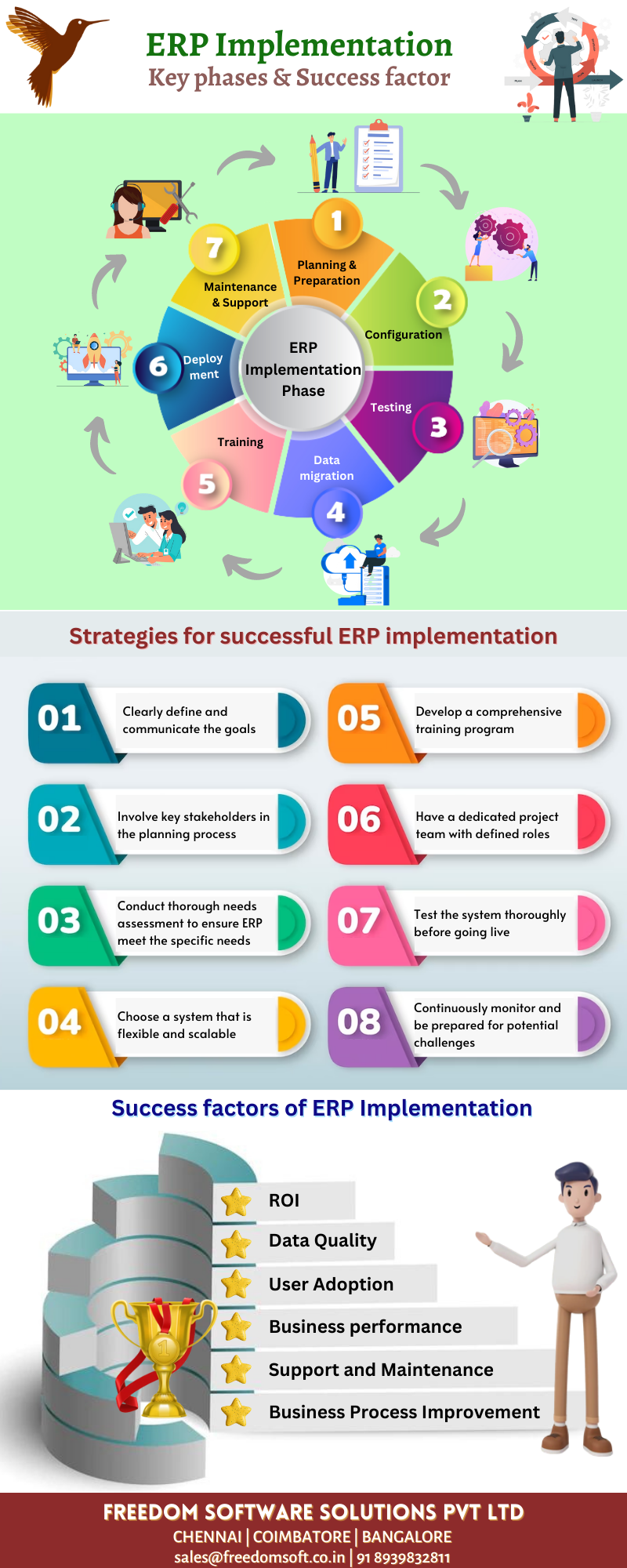
The 7 Phases of Small Business ERP Implementation
Implementing an ERP system is a journey best approached in structured phases. While each business is unique, these phases provide a universal framework.
Phase 1: Planning & Strategy – Laying the Foundation
This is arguably the most critical phase. A well-defined plan sets the stage for success, preventing costly missteps later on.
-
Define Clear Goals and Objectives:
- What specific problems do you want to solve? (e.g., "Reduce order fulfillment time by 20%", "Improve inventory accuracy to 95%").
- How will you measure success? (Key Performance Indicators – KPIs).
- Ensure goals are SMART: Specific, Measurable, Achievable, Relevant, Time-bound.
- Small Business Tip: Keep goals realistic. Don’t try to solve every problem at once. Prioritize the most impactful areas.
-
Assemble Your Project Team:
- Executive Sponsor: A key decision-maker with authority and commitment to the project.
- Project Manager: An internal champion responsible for overseeing the project day-to-day. This might be a business owner or a trusted employee.
- Departmental Leads/Key Users: Representatives from each department (finance, sales, operations, etc.) who understand their processes and will be end-users.
- Small Business Tip: Your team might be small, with individuals wearing multiple hats. Ensure everyone understands their role and time commitment.
-
Establish Budget & Timeline:
- Beyond software licensing, factor in implementation costs (consultants), training, data migration, potential hardware upgrades, and ongoing maintenance/support.
- Set a realistic timeline, understanding that unforeseen challenges can occur.
- Small Business Tip: Be transparent about budget constraints with potential vendors. Explore SaaS (Software-as-a-Service) options, which typically have lower upfront costs and predictable monthly fees, making them ideal for small businesses.
-
Scope Definition:
- Determine which modules and functionalities are absolutely necessary for your business now. Avoid "scope creep" – adding features that aren’t critical.
- Small Business Tip: Start with core functionalities and plan for future expansion. A phased approach can be more manageable.
Phase 2: Software Selection – Finding the Right Fit
Choosing the right ERP system is paramount. It’s not just about features, but also about vendor support, scalability, and ease of use.
-
Detailed Requirements Gathering:
- Document your current business processes ("as-is") and identify desired future processes ("to-be").
- Create a comprehensive list of functional (what the system does) and non-functional (performance, security, usability) requirements.
- Small Business Tip: Focus on your unique needs. Don’t just copy a list from another company. Prioritize "must-have" vs. "nice-to-have" features.
-
Market Research & Vendor Shortlisting:
- Research ERP solutions suitable for small businesses (e.g., NetSuite, QuickBooks Enterprise, Odoo, SAP Business One, Microsoft Dynamics 365 Business Central, Sage, Zoho ERP, Acumatica).
- Look for industry-specific solutions if your business has unique requirements.
- Read reviews, consult industry experts, and ask for recommendations.
- Small Business Tip: Consider cloud-based solutions for lower IT overhead and better accessibility. Look for vendors with a strong track record of supporting small businesses.
-
Vendor Demos & Evaluation:
- Invite shortlisted vendors to demonstrate how their system addresses your specific requirements, using your actual business scenarios.
- Prepare a standardized scorecard to evaluate each vendor on criteria like functionality, usability, scalability, support, and cost (Total Cost of Ownership – TCO).
- Check references from similar small businesses.
- Small Business Tip: Involve your key users in demos. Their feedback on user-friendliness is invaluable. Don’t be afraid to ask tough questions.
-
Contract Negotiation:
- Review contracts carefully, paying attention to licensing costs, implementation fees, support agreements, and service level agreements (SLAs).
- Small Business Tip: Negotiate. Don’t settle for the first offer. Ensure clarity on what’s included and what’s extra.
Phase 3: Preparation – Getting Ready for Transformation
Once the software is selected, the real work of preparing your organization begins.
-
Data Cleansing & Migration Strategy:
- Cleanse: This is critical. Identify, correct, and remove inaccurate, incomplete, or irrelevant data from your existing systems. "Garbage in, garbage out" applies here.
- Map: Determine how data from your old systems will map to the new ERP system’s structure.
- Strategy: Decide on the migration approach (e.g., "big bang" where all data is moved at once, or phased migration).
- Small Business Tip: This can be a labor-intensive task. Start early and dedicate sufficient time and resources. Consider using data migration tools if available.
-
Process Mapping & Re-engineering:
- Document your current business processes in detail.
- Identify opportunities to optimize and streamline these processes within the new ERP system. Don’t just replicate old, inefficient ways of working.
- Small Business Tip: Embrace the opportunity to improve. The ERP should enable better processes, not just automate existing ones.
-
Infrastructure Assessment (if applicable):
- If you’re using an on-premise ERP (less common for small businesses), ensure your hardware and network can support the new system.
- For cloud-based ERPs, ensure reliable internet connectivity.
- Small Business Tip: Cloud ERPs significantly reduce infrastructure concerns, making them a preferred choice.
-
Change Management Strategy:
- Prepare your employees for the upcoming changes. Communication is key.
- Explain the benefits of the new system, address concerns, and involve them in the process.
- Small Business Tip: Small businesses often have a tighter-knit culture, which can be an advantage for change management if handled with empathy and clear communication.
Phase 4: Implementation & Configuration – Building the System
This is where the chosen ERP system is tailored and built according to your requirements.
-
System Setup & Configuration:
- Install the software (for on-premise) or set up user accounts (for cloud).
- Configure modules (e.g., accounting, inventory, CRM) to align with your re-engineered business processes.
- Set up user roles, permissions, workflows, and approval processes.
- Small Business Tip: Resist the urge for extensive customization unless absolutely necessary. Customizations can increase costs, complicate upgrades, and prolong implementation. Aim for "configuration" over "customization."
-
Data Migration Execution:
- Execute the data migration plan developed in Phase 3.
- Import cleansed data into the new ERP system.
- Small Business Tip: Perform this in stages, if possible, starting with less critical data, and always have backups.
-
Integrations:
- If your ERP needs to connect with other critical systems (e.g., e-commerce platform, shipping software, payroll), set up and test these integrations.
- Small Business Tip: Prioritize essential integrations. Not every system needs to be integrated immediately.
Phase 5: Testing & Training – Ensuring Readiness
Thorough testing and comprehensive training are crucial for user adoption and system stability.
-
User Acceptance Testing (UAT):
- Key users from each department should test the system using real-world scenarios.
- Verify that all configured processes work as expected and meet business requirements.
- Document any issues, bugs, or discrepancies for resolution.
- Small Business Tip: Don’t rush UAT. It’s better to find problems now than after go-live. Involve actual end-users in testing.
-
Performance & Security Testing:
- Ensure the system performs adequately under expected load.
- Verify that security protocols are robust and user permissions are correctly applied.
-
Comprehensive Training:
- Develop a training plan tailored to different user roles.
- Conduct hands-on training sessions for all end-users.
- Provide clear documentation, user manuals, and quick reference guides.
- Small Business Tip: Training should be practical and repetitive. Consider having a "super user" or "ERP champion" in each department who can provide ongoing support.
Phase 6: Go-Live – The Big Day
This is the moment of truth when your business transitions to the new ERP system.
-
Final Data Migration:
- Perform the final transfer of transactional data (e.g., open orders, current inventory levels) from legacy systems to the ERP.
- Small Business Tip: Schedule go-live during a period of lower business activity, if possible, to minimize disruption.
-
Cutover Strategy:
- Define a clear plan for switching from the old systems to the new ERP.
- This might involve a "big bang" (all at once) or a phased rollout (module by module or department by department).
- Small Business Tip: For small businesses, a phased approach can reduce risk and allow for smoother transitions, though it might extend the overall timeline.
-
Launch Support:
- Have your project team and, if possible, vendor support staff on standby to assist users immediately after go-live.
- Small Business Tip: Provide multiple channels for users to report issues or ask questions (e.g., dedicated helpdesk, email, chat).
Phase 7: Post-Implementation & Optimization – Continuous Improvement
Go-live is not the end of the journey; it’s the beginning of leveraging your investment.
-
Post-Launch Support:
- Continue to provide dedicated support to users as they adapt to the new system.
- Address any remaining bugs or configuration issues promptly.
-
Performance Monitoring & Feedback:
- Continuously monitor system performance and user adoption.
- Gather feedback from users on what’s working well and what needs improvement.
- Small Business Tip: Schedule regular check-ins with department leads to discuss system usage and identify areas for optimization.
-
System Optimization:
- Based on feedback and performance data, make continuous adjustments and optimizations to workflows, reports, and configurations.
- Explore additional modules or functionalities that can add further value.
- Small Business Tip: ERP is a living system. Regularly review and refine its use to ensure it continues to meet your evolving business needs.
-
Ongoing Training & Updates:
- Provide refresher training for existing users and onboarding for new employees.
- Stay informed about software updates and new features released by your ERP vendor.
Key Success Factors for Small Business ERP Implementation
- Strong Leadership & Executive Buy-in: The business owner or top management must champion the project.
- Clear Communication & Change Management: Keep employees informed, address concerns, and manage expectations proactively.
- Realistic Expectations: Understand that implementation is a journey, not an overnight fix. There will be challenges.
- Dedicated Project Team: Even if small, having a focused team ensures accountability.
- Data Quality: Invest time in cleansing and preparing your data.
- User Training & Adoption: A powerful system is useless if employees don’t know how to use it or refuse to adopt it.
- Vendor Relationship: Choose a vendor that understands small business needs and offers reliable support.
- Focus on Core Needs First: Don’t get overwhelmed by features. Address your most pressing pain points.
Common Pitfalls to Avoid
- Lack of Clear Objectives: Without defined goals, success is impossible to measure.
- Insufficient Budget or Resources: Underestimating costs or internal time commitments.
- Poor Data Management: Migrating bad data will lead to bad results.
- Ignoring Change Management: Employee resistance can derail even the best system.
- Over-customization: Increases complexity, cost, and difficulty with upgrades.
- Inadequate Testing & Training: Leads to errors, frustration, and low user adoption.
- Lack of Post-Go-Live Support: Leaving users stranded after launch will quickly lead to disengagement.
Conclusion
Implementing an ERP system for your small business is a significant investment of time, money, and effort. However, with careful planning, a structured approach, and a commitment to change, it can be a transformative step towards greater efficiency, better decision-making, and sustainable growth. By following this comprehensive guide, small businesses can navigate the complexities of ERP implementation, avoid common pitfalls, and successfully leverage technology to thrive in the digital age. Embrace the journey, and prepare to unlock your business’s full potential.